

A user access review (UAR) is a recurring, auditable verification that every person and non-human identity in your environment still needs the access they currently hold, documented with a dated sign-off and a named reviewer. If your program is missing or stale, three actions will move you forward this week:
- Refresh your access inventory. Pull a current export from Active Directory, Microsoft Entra ID, or your HR system and reconcile it against your application list. Identify accounts with no recent login, terminated employees still provisioned, and service accounts with no documented owner.
- Assign system owners. Every application and privileged role needs a named owner who is accountable for approving or revoking access. Without this, reviews stall at the first escalation.
- Schedule your first review. Put a date on the calendar within the next 30 days. Even a narrow scope (privileged accounts only, or a single critical application) produces the first dated evidence artifact auditors will ask for.
The minimum evidence set auditors expect from any review: a date-stamped sign-off, the reviewer's name and role, a decision for every account (keep, modify, or remove), and remediation ticket IDs confirming revocation happened in the source system.
Key Takeaways
A user access review is a recurring, auditable verification that every identity in your environment still needs the access it holds, and the evidence it produces is what auditors actually test against.
| Point | Details |
|---|---|
| Start with inventory and offboarding | Automate HR-triggered revocation and refresh your access inventory before running any review cycle. |
| Privileged accounts first | Review domain admins and global admins monthly or quarterly with mandatory written justification for every "keep" decision. |
| Evidence is the product | Every review must produce a dated sign-off, named reviewer, per-account decisions, and remediation ticket IDs confirmed in source systems. |
| Cadence by risk tier | High-sensitivity systems quarterly, standard SaaS semiannually, low-risk systems annually, per ISO 27001 and SOC 2 guidance. |
| CisoSafe accelerates the program | CisoSafe's vCISO engagements and compliance platform deliver policy, cadence design, and automated audit-ready evidence for regulated U.S. organizations. |
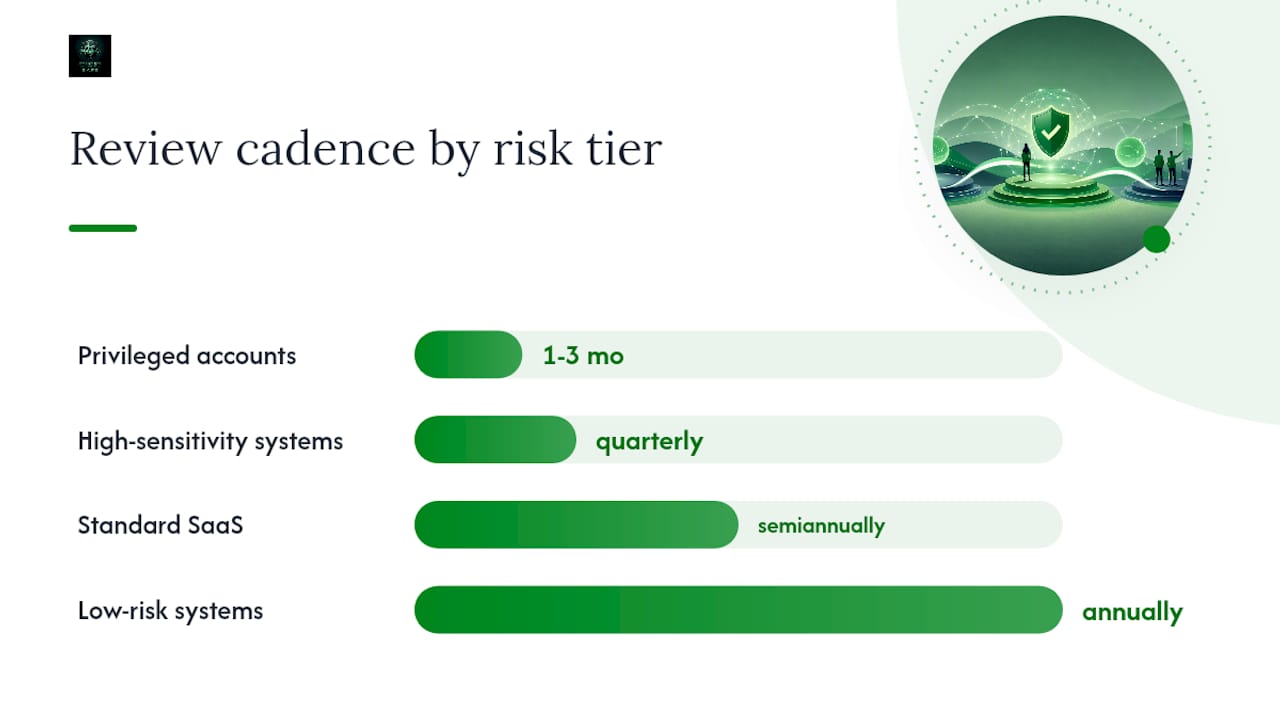
Table of Contents
- What are user access reviews and how do they fit into IAM, IGA, and PAM?
- Why conduct access reviews: security, compliance, and cost drivers
- What types of access reviews should you run, and how do you scope them?
- How to run a user access review: operational checklist you can use today
- Who should review access, how often, and what SLAs apply?
- What automation and tooling features matter most for access reviews?
- How to handle privileged, service, shared, and orphaned accounts
- What are the most common access review failures and how do you fix them?
- What metrics and artifacts do auditors actually expect?
- Copyable sample checklist and reviewer template
- How a vCISO and compliance platform accelerate your access review program
- The access review priority sequence that actually matters
- CisoSafe helps you build and sustain audit-ready access reviews
- Sources
What are user access reviews and how do they fit into IAM, IGA, and PAM?
A user access review is not the same as provisioning or authentication. Provisioning grants access; authentication verifies identity at login. A UAR does something different: it periodically confirms that access granted in the past is still appropriate today, with an auditable record of who made that judgment and when.
UARs sit at the intersection of three disciplines. Identity and Access Management (IAM) handles the lifecycle of accounts and credentials. Identity Governance and Administration (IGA) adds policy, role definitions, and the review workflows that enforce those policies over time. Privileged Access Management (PAM) focuses specifically on high-risk accounts with elevated rights. A mature access review program touches all three: it uses IAM data as its input, IGA tooling to run the workflow, and PAM evidence to validate privileged account decisions.
The operational flow looks like this:
Inventory (who has what access) → Reviewer assignment (who is accountable for each decision) → Decision (keep, modify, or remove) → Remediation (revoke or adjust in source systems) → Evidence (immutable record of every step, with timestamps and ticket IDs)
Each stage must produce an artifact. An inventory without a reviewer assignment is incomplete. A reviewer decision without a remediation ticket is unverifiable. A ticket without confirmation of revocation in the source system is the most common gap auditors find.
Pro Tip: Pair your UAR workflow with joiner/mover/leaver (JML) events. When HR triggers a termination or a role change, that event should automatically flag the affected accounts for immediate review rather than waiting for the next scheduled cycle. This single integration eliminates the most common audit finding: active accounts for former employees.
ISACA documents that access management is one of the most frequently cited sources of IT General Controls (ITGC) audit findings, which means the gap between "we have a process" and "we have auditable evidence of a process" is where most organizations get cited.
Why conduct access reviews: security, compliance, and cost drivers
Access reviews are not a compliance checkbox. They are a control that directly reduces the probability and blast radius of a breach.
The security case
Three risk patterns make UARs operationally necessary:
- Privilege creep. Users accumulate permissions over time as roles change, projects end, or systems migrate. Without periodic reviews, a developer who moved to a management role may still hold production database write access they no longer need.
- Orphaned accounts. Terminated employees, contractors, and vendors whose accounts were never deprovisioned represent live credentials with no active owner. These are among the easiest targets for credential-based attacks.
- Lateral movement risk. Excessive permissions expand the attack surface an adversary can exploit after initial compromise. NIST's defense-in-depth framework positions access control as a foundational layer of layered security, precisely because limiting what a compromised identity can reach limits the damage.
The compliance case
Every major framework your auditors test against includes access review requirements:
- SOC 2. The Common Criteria (CC6.2, CC6.3) require that access is provisioned and removed based on authorization, and that access is reviewed periodically. Auditors will ask for evidence of completed reviews, reviewer identities, and remediation records.
- HIPAA. HHS administrative safeguards require covered entities to implement procedures for authorizing and monitoring access to protected health information. A periodic access review is the standard mechanism for demonstrating that monitoring is active.
- PCI DSS. The PCI DSS Quick Reference Guide requires periodic review of user accounts and access privileges for systems that handle cardholder data, along with logging and evidence of those reviews.
- SOX. The SEC's SOX 404 study identifies access controls as a recurring source of internal control weaknesses in 404 testing. Auditors specifically look for evidence that access to financial systems is reviewed and that segregation of duties is enforced.
- ISO 27001. Annex A.9 requires an access control policy and periodic review of user access rights, with documented evidence of those reviews.
The operational cost case
Beyond security and compliance, access reviews reduce operational costs in two concrete ways. First, they surface unused licenses: SaaS seats held by inactive or departed users represent direct spend with no return. Second, they reduce incident response scope. When a breach occurs, a clean access inventory means your team can identify affected accounts and revoke credentials faster, which shortens containment time.
What types of access reviews should you run, and how do you scope them?
Not every system or account type warrants the same review shape. Scoping decisions should follow four factors: materiality of the data the system holds, how frequently access changes, sensitivity of the role or entitlement, and whether a named owner is available to make decisions.
Review types by scope
- Group-based reviews. Verify that every member of a security group or distribution list still belongs. Useful for Active Directory and Entra ID groups that gate access to shared resources.
- Application-based reviews. Review all users provisioned to a specific application (a CRM, ERP, or cloud service). Particularly useful for SaaS applications where provisioning is managed outside your core directory.
- Role-based reviews. Confirm that users assigned to a role (admin, read-only, billing manager) still require that level of access. Role reviews catch privilege creep more precisely than group reviews.
- Privileged role reviews. A separate, higher-frequency review of accounts with elevated rights: domain admins, global admins, root access, PAM vault accounts. These carry the highest risk and require the shortest review cycle.
- Guest and contractor reviews. External identities often persist long after a project ends. A dedicated guest review confirms that B2B collaboration accounts and contractor credentials are still active and justified.
- Service and non-human identity reviews. Service accounts, API keys, and managed identities are frequently missed in standard reviews. They need a separate workflow that captures the owning team, the business justification, and an expiry or rotation schedule.
Scoping decision flow
- Classify each system by data sensitivity (high, medium, low) and regulatory scope (in-scope for SOC 2, HIPAA, PCI, SOX, or not).
- Identify the change frequency: systems with frequent role changes need more frequent reviews.
- Confirm owner availability: if no named owner exists, assign one before scheduling the review.
- Set the cadence: privileged accounts quarterly or monthly, high-sensitivity SaaS applications quarterly, standard SaaS semiannually, low-risk systems annually.
A practical example: a law firm running SOC 2 and HIPAA reviews would schedule monthly privileged account reviews for its domain admins, quarterly reviews for its matter management and document systems, semiannual reviews for productivity SaaS, and annual reviews for low-sensitivity internal tools. For regulated industries like legal services, the cost of a missed review is not just an audit finding; it is a malpractice and reputational exposure.
How to run a user access review: operational checklist you can use today
The following checklist maps each step to its expected output, owner, and auditor artifact. Copy it into your ticketing system or review tool and assign owners before the review window opens.
Pre-work (one to two weeks before review opens)
- Pull a fresh access export from every in-scope system. Reconcile against HR data to flag terminated or transferred users.
- Confirm role baselines exist for every in-scope role. If a baseline does not exist, document the intended access level before the review starts.
- Assign a named reviewer to every system or role group. Confirm availability and send advance notice with instructions.
- Sync joiner/mover/leaver data. Any terminations or role changes since the last review should be pre-flagged for immediate action.
Review execution (review window: 5–10 business days)
- Open the review in your IGA tool or spreadsheet. Each reviewer sees only their assigned scope.
- For every account, the reviewer makes an explicit decision: keep (access is still appropriate), modify (change the role or permission level), or remove (revoke access entirely).
- Reviewers must provide a justification for every "keep" decision on privileged accounts. A blank justification field is not an acceptable record.
- Capture the reviewer's name, timestamp, and decision for every line item. This is the core evidence artifact.
Remediation (within SLA after review closes)
- Generate a remediation ticket for every "modify" or "remove" decision. The ticket must reference the review ID, the account, and the required action.
- Revoke or adjust access in the source system within the agreed SLA (see cadence section for SLA guidance).
- Confirm revocation by pulling a post-remediation export and comparing it to the review decisions. Document the confirmation.
Completion and reporting
- Produce an immutable completion record: a signed, date-stamped report showing total accounts reviewed, decisions by type, remediation tickets generated, and outstanding items.
- Export the report in a format your auditors can receive (PDF, CSV, or direct from your IGA tool).
- Archive the report and all supporting artifacts for the retention period your compliance framework requires (typically one to three years).
| Step | Expected Output | Owner | Auditor Artifact |
|---|---|---|---|
| Access inventory refresh | Reconciled account list with HR data | IT/IAM team | Exported account list with date stamp |
| Role baseline confirmation | Documented intended access per role | System owner | Role baseline document |
| Reviewer assignment | Named reviewer per system/role | Security/compliance lead | Reviewer assignment log |
| Review execution | Decision (keep/modify/remove) per account | Assigned reviewer | Signed review record with timestamps |
| Remediation ticketing | Ticket per modify/remove decision | IT/IAM team | Ticket list with IDs and closure dates |
| Source system verification | Post-remediation export confirming revocations | IT/IAM team | Before/after access comparison |
| Completion report | Immutable signed report | Security/compliance lead | Exportable PDF or IGA report |
Pro Tip: The single most common audit failure is rubber-stamping: reviewers clicking "keep" on every account without reading the list. Counter this by requiring written justification for every privileged account decision, and by running a "review by exception" model where accounts flagged as high-risk or inactive are surfaced first. When reviewers know their name is on every decision, approval rates for questionable accounts drop sharply.
Practical guidance from CertPilot emphasizes that producing an immutable completion record at the end of each cycle is the single step that most shortens audit cycles, because it gives auditors a single artifact to anchor their testing rather than requiring them to reconstruct the review from scattered exports.
Who should review access, how often, and what SLAs apply?
Reviewer selection models
Choosing the right reviewer model is as important as choosing the right cadence. Four models are in common use:
- Self-review. The user attests that their own access is still needed. Appropriate for low-risk, non-privileged accounts where the user is the best judge of their own role. Carries the highest rubber-stamping risk and should not be used for privileged or sensitive entitlements.
- Manager attestation. The user's direct manager reviews and approves access. Works well for role-based reviews where the manager understands the user's current responsibilities. Requires accurate HR reporting lines.
- System owner review. The owner of the application or system reviews all provisioned users. Best for application-based reviews where the owner understands who should have access. Scales poorly when one owner is responsible for hundreds of accounts.
- Delegated reviewer. A security or compliance team member reviews on behalf of an owner who lacks the context or availability. Useful for service accounts and orphaned accounts where no natural owner exists.
Microsoft Entra's access review configuration supports all four models natively, including automated reminders and escalation to a fallback reviewer when the primary reviewer does not respond within a configured window.
Recommended cadences by risk tier
- Privileged accounts (domain admins, global admins, PAM vault accounts): monthly or quarterly. Any account with the ability to modify security controls or access sensitive data at scale warrants the shortest cycle.
- High-sensitivity applications (financial systems, EHR, cardholder data environments): quarterly. These are the systems auditors test most closely under SOC 2, HIPAA, and PCI DSS.
- Standard SaaS and productivity tools: quarterly or semiannual, depending on user turnover rate and sensitivity of the data.
- Low-risk internal tools: annual, provided the system holds no regulated data and access changes infrequently.
ISO/IEC 27001 guidance suggests a risk-based cadence, with quarterly reviews for enterprise environments and semiannual reviews for smaller organizations, as a reasonable baseline for Annex A.9 compliance.
SLA expectations for remediation
- Terminated employees: access revocation within 24 hours of the HR termination event, confirmed in source systems.
- Privileged account removals flagged during review: within 24–72 hours of the review decision.
- Non-urgent access modifications or removals: within 7–14 days of the review closing.
- Outstanding items at SLA expiry: escalate to the system owner's manager and document the escalation in the remediation ticket.
Managing reviewer burden
Reviewer overload is one of the top reasons access review programs fail. Limit each reviewer's scope to a manageable number of accounts per cycle. Use exception windows: give reviewers a defined period (five to seven business days) with automated reminders at day two and day four. When a reviewer does not respond by day five, escalate automatically to their manager or a delegated backup. Keeping scopes tight and reminders automated is what separates a program that produces clean evidence from one that produces a pile of overdue tickets every quarter.
What automation and tooling features matter most for access reviews?
Manual access reviews run in spreadsheets are auditable in theory but fragile in practice. A single version-control error or a missing timestamp can invalidate an entire review cycle's evidence. The right tooling eliminates those failure modes and reduces reviewer friction at the same time.
Core features to prioritize
- Identity source integrations. Your review tool must pull live data from your authoritative sources: Active Directory, Microsoft Entra ID, HR systems via SCIM, and any SaaS applications with SCIM or API connectors. Stale input data is the root cause of most review failures.
- Automated reviewer assignment. The tool should assign reviewers based on system ownership or org-chart data, not manual configuration each cycle.
- Remediation ticketing. Decisions should automatically generate tickets in your ITSM tool (ServiceNow, Jira, or similar) with the account, required action, and SLA pre-populated.
- Immutable completion records. The tool must write a tamper-evident record of every decision, reviewer identity, and timestamp. This is what auditors mean when they ask for "evidence of review."
- Exportable audit reports. Reports should be exportable in formats auditors can work with, showing reviewer decisions, remediation status, and outstanding items.
Vendor examples worth evaluating
Microsoft Entra ID Governance includes built-in access reviews for groups, applications, and role assignments within the Microsoft 365 and Azure ecosystem. Entra's access review features support recurring cadences, multiple reviewer types, automated reminders, and auto-apply decisions. Advanced features (recurring reviews, multi-stage reviews, and recommendations based on last sign-in) require Microsoft Entra ID Governance licensing, which is an add-on to standard Entra ID P2. Best suited for organizations already standardized on Microsoft identity infrastructure.
ConductorOne is an IGA platform built for cloud-first environments. It focuses on access request workflows, access reviews, and automated provisioning and deprovisioning across SaaS applications. Its reviewer UX is designed to reduce friction for non-technical reviewers, and it integrates with a broad catalog of SaaS connectors. Typically targets mid-market to enterprise organizations with complex SaaS portfolios.
Drata is a compliance automation platform that includes access review workflows as part of its broader SOC 2, HIPAA, and ISO 27001 evidence collection. It is particularly useful for organizations that want access review evidence collected alongside other compliance controls in a single platform, reducing the effort of audit preparation. Best suited for organizations running continuous compliance programs rather than point-in-time audits.
Practical integration checklist
- Map your source-of-truth systems: which directory or HR system is authoritative for each user population?
- Confirm service account coverage: does your tool capture non-human identities, or do those require a separate manual process?
- Verify API-based remediation: can the tool revoke access directly via API, or does it generate a ticket for manual action? API-based remediation is faster and produces cleaner evidence.
- Test the export format: run a sample review and export the report before your first real cycle. Auditors have rejected evidence packages because the export format was unreadable.
How to handle privileged, service, shared, and orphaned accounts
Standard review workflows are not sufficient for high-impact non-standard identities. These accounts carry disproportionate risk and require separate handling.
Privileged accounts
Privileged accounts (domain admins, global admins, database owners, PAM vault accounts) should be reviewed on a shorter cycle than standard accounts, with mandatory written justification for every "keep" decision. Link your PAM tool's session logs and vault access records to the review outcome: if a privileged account has no recorded sessions in the past 90 days, that is a strong signal for removal or suspension, not a rubber-stamp approval.

For organizations using Microsoft Entra Privileged Identity Management (PIM), just-in-time activation logs are a natural input to the review: accounts that have never activated their eligible role assignment are candidates for removal.
Service accounts and non-human identities
Service accounts are the most frequently missed category in access reviews. They have no human owner who logs in and notices when something is wrong, and they often hold persistent, high-privilege credentials. For each service account, your review record should capture:
- The owning team and a named technical contact
- The business justification for the account's current permission level
- The last-used date (from directory or application logs)
- An expiry or rotation schedule for the credentials
Service accounts with no documented owner should be suspended, not simply flagged. Suspension forces the owning team to come forward and justify reactivation.
Orphaned accounts
An orphaned account is any account whose owner has left the organization or whose purpose no longer exists. Detection methods include cross-referencing your access inventory against HR termination data, checking last-login dates against a defined inactivity threshold (typically 30–90 days), and scanning for accounts with no manager attribute in the directory. Once identified, orphaned accounts should be disabled immediately and removed after a short hold period (typically 30 days) to allow for any business continuity exceptions.
Pro Tip: Tag every privileged entitlement in your IGA tool with a risk classification label (e.g., "Tier 0," "Tier 1") and configure your review workflow to require owner justification for any Tier 0 decision. This single configuration change makes it structurally impossible for a reviewer to approve a domain admin account without typing a reason, which is exactly the kind of friction that prevents rubber-stamping at the highest risk level.
What are the most common access review failures and how do you fix them?
Most access review programs fail not because the process is wrong but because the inputs are stale, the reviewers are overloaded, or the evidence is incomplete. Here are the failure modes that appear most often, and the fixes that work.
- Stale input data. Reviews run against an outdated access export miss accounts added or removed since the last pull. Fix: automate the inventory refresh as the first step of every review cycle, pulling live data from the source system on the day the review opens.
- Rubber-stamping. Reviewers approve every account without reading the list, often because the scope is too large or the instructions are unclear. Fix: limit scope per reviewer, require written justification for privileged decisions, and use sampling to spot-check reviewer decisions before the cycle closes.
- Missing non-human identities. Service accounts, API keys, and shared credentials are excluded from the review scope. Fix: maintain a separate non-human identity inventory and include it in every review cycle, even if the workflow is manual.
- Skipped systems. Low-visibility systems (legacy applications, shared drives, VPN groups) are excluded because no owner is assigned. Fix: require a named owner for every system before it can be excluded from a review. "No owner" is not a valid exclusion reason; it is a gap that needs to be closed.
- Reviewer overload. A single reviewer is assigned hundreds of accounts across multiple systems. Fix: distribute scope across multiple reviewers, use automated reminders, and set a hard cap on accounts per reviewer per cycle.
A common root cause pattern: an organization runs its first SOC 2 audit and discovers that three of its five critical applications have no documented review history because the system owners were never formally assigned. The fix is not to run a retroactive review (auditors will not accept it as evidence for the prior period) but to document the gap, assign owners immediately, and run the first formal review within 30 days. That documented response to a gap is itself evidence of a functioning control environment.
What metrics and artifacts do auditors actually expect?
Auditors do not want to see that you ran a review. They want to see that the review produced a decision for every account, that removals happened, and that you can prove it. The distinction matters.
Metrics that demonstrate program health
- Percent reviewed on time. The share of accounts reviewed within the scheduled window. A low rate signals process or resourcing problems.
- Exception rate. The proportion of accounts that required a modification or removal. A rate near zero on every cycle is a rubber-stamping signal, not a clean bill of health.
- Privileged accounts remediated. Whether privileged accounts are regularly removed or downgraded per cycle. Auditors want to see evidence of such remediation occurring.
- Mean time to revoke (MTTR). The interval between a "remove" decision and confirmed revocation in the source system, ideally meeting established SLA targets.
- Outstanding remediation aging. The number and age of remediation tickets not yet closed, with those exceeding SLA posing a compliance risk.
Artifacts auditors request
- Signed review report. A dated, named record showing the review scope, reviewer identities, total accounts reviewed, and decision counts by type.
- Remediation ticket list. Every modify or remove decision should map to a ticket ID with an open and close date.
- Offboarding logs cross-referenced with last-active dates. Auditors will pull your HR termination list and check whether those accounts were disabled promptly. The cross-reference is the evidence.
- Post-remediation access export. A system export taken after remediation confirms that revocations actually happened in the source system, not just in the review tool.
SOC 2 access control evidence guidance from OnePAM notes that auditors prefer timestamped reports from automated tools over manually assembled spreadsheets, because the tool's output is harder to retroactively alter and carries an implicit chain of custody.
Pro Tip: Configure your IGA tool or review platform to write an immutable completion record the moment the review closes. This record should be locked against editing and should include the review ID, close date, reviewer names, decision counts, and a link to the remediation ticket list. When an auditor asks "how do I know this review actually happened?", you hand them this record. That single artifact can replace hours of auditor questioning.
Copyable sample checklist and reviewer template
Access review cycle checklist (paste into your ticketing system)
- Pull fresh access export from all in-scope systems (date: ______).
- Reconcile against HR termination and role-change data from the same date.
- Confirm role baselines exist for all in-scope roles. Document any gaps.
- Assign named reviewers to each system or role group. Send advance notice.
- Open review in IGA tool or spreadsheet. Set review window close date.
- Reviewers complete decisions (keep/modify/remove) with justification for all privileged accounts.
- Security lead spot-checks a sample of "keep" decisions before the window closes.
- Generate remediation tickets for all modify/remove decisions. Assign SLAs.
- IT/IAM team executes revocations in source systems within SLA.
- Pull post-remediation export and compare to review decisions. Document confirmation.
- Produce immutable completion report. Archive with all supporting artifacts.
- Schedule next review cycle.
Reviewer decision template (one row per account)
- Reviewer name: ______
- Review date: ______
- System/application: ______
- Account name/ID: ______
- Current role/permission level: ______
- Decision: Keep / Modify / Remove
- Justification (required for privileged accounts): ______
- Requested new role (if Modify): ______
- Remediation ticket ID (if Modify or Remove): ______
- Reviewer notes: ______
- Timestamp: ______
Required attachments for auditors
- Completed reviewer template (all rows, no blanks in the Decision column)
- Remediation ticket list with open and close dates
- Post-remediation access export from source system
- Immutable completion report signed by the security or compliance lead
- Role baseline document for each in-scope role
Justification wording examples for "keep" decisions on privileged accounts: "Account requires domain admin rights to manage Group Policy Objects for the production environment. Role confirmed active by IT manager [name] on [date]." Or: "Service account used by [application] to write to [database]. Credential rotation scheduled for [date]. Owner: [team name]."
How a vCISO and compliance platform accelerate your access review program
Standing up a repeatable, audit-ready access review program from scratch typically takes three to six months when done manually. A vCISO engagement compresses that timeline by delivering the policy framework, cadence design, tooling integration, and evidence templates in the first 30–60 days, so your team is running structured reviews rather than building infrastructure.
What a vCISO engagement typically delivers for access review programs:
- A written access review policy aligned to your specific compliance frameworks (SOC 2, HIPAA, PCI DSS, CMMC, or ISO 27001)
- A cadence schedule mapped to your risk tiers and regulatory deadlines
- Reviewer assignment logic and escalation protocols documented in your ITSM tool
- Evidence templates pre-formatted for the artifacts your auditors will request
- Integration guidance for connecting your HR system, directory, and IGA tool
The compliance platform side handles what policy alone cannot: automated evidence capture, immutable completion records, and reporting that auditors can consume directly. When a review closes, the platform writes a locked record with reviewer identities, decision counts, and remediation ticket references, reducing the audit preparation cycle from days to hours.
Anonymized outcomes from organizations that have formalized their access review programs with vCISO support include reduced mean time to revoke (from weeks to within SLA), elimination of repeat audit findings on access control, and first-time SOC 2 Type II certification without access-related exceptions. The security risk roadmap approach that underpins these engagements prioritizes inventory and offboarding automation first, because those two controls eliminate the most common audit findings before the first review cycle runs.
The access review priority sequence that actually matters
Most organizations approach access reviews in the wrong order. They start with broad SaaS coverage because it feels manageable, then discover six months later that their privileged accounts have never been formally reviewed and their offboarding process has no automated trigger. That sequencing produces a lot of completed reviews and very little risk reduction.
The right sequence is the opposite. Start with offboarding automation: the moment HR marks a termination, access revocation should trigger automatically across your critical systems. This single control eliminates the orphaned account problem at its source and produces immediate, verifiable evidence for auditors. Next, lock down privileged accounts. A domain admin or global admin account that has never been reviewed is a higher-probability breach vector than a hundred unreviewed SaaS seats. Get those accounts on a monthly or quarterly cycle with mandatory justification before you expand scope anywhere else.
Only after those two foundations are in place does it make sense to build out broad SaaS coverage. By then, your evidence templates are tested, your reviewers know the process, and your remediation SLAs are calibrated to what your team can actually execute.
The other trade-off worth naming: audit-ready evidence and operational load are in genuine tension. A program that produces perfect evidence but burns out your reviewers will collapse after the first audit. Keep scopes tight, automate reminders, and use exception-based review models for low-risk accounts. The goal is a program your team can sustain for three years, not one that looks perfect for a single audit cycle.
For leadership buy-in, frame access reviews in terms of breach cost reduction and audit finding avoidance, not process compliance. A single orphaned admin account that enables a breach costs orders of magnitude more than the annual cost of a structured review program.
CisoSafe helps you build and sustain audit-ready access reviews
Running access reviews manually is possible. Sustaining them across multiple frameworks, multiple systems, and multiple reviewer populations, while producing clean evidence every cycle, is where most teams hit a wall.
CisoSafe delivers vCISO engagements and an AI-powered compliance platform purpose-built for regulated organizations across the United States. For access review programs specifically, that means a written policy aligned to your frameworks, a cadence schedule your team can actually execute, and automated evidence exports your auditors can consume directly, without manual assembly.
Organizations working with CisoSafe avoid the most common audit finding pattern: a review process that exists on paper but cannot produce dated, reviewer-attributed evidence on demand. The platform writes immutable completion records at the close of every cycle, and the vCISO team designs the reviewer workflow so that escalation, justification requirements, and SLA tracking are built in from the start, not added after the first finding.
If your access review program is missing, stale, or producing evidence that does not hold up under auditor scrutiny, request a compliance assessment with CisoSafe. The assessment identifies your current gaps, maps them to your specific frameworks, and delivers a prioritized remediation plan within 30 days.
Sources
Use these sources to drill into specific framework requirements and implementation details during audit preparation. Each one is directly relevant to the access review controls your auditors will test.
- Manage user access with access reviews - Microsoft Entra ID Governance | Microsoft Learn
- Effective User Access Reviews - ISACA Journal
- NIST glossary — defense in depth
- SEC SOX 404 study
- HHS — HIPAA
- PCI DSS quick reference guide (QRG)