

A risk register is the master list of every identified risk on a project or program, with an owner, a score, and a documented response attached to each one. For small projects, a six-field spreadsheet handles the job. For delivery programs, you need likelihood-times-impact scoring layered on top. For cybersecurity and regulated environments, a Concise Statement Risk Register paired with a Risk Detail Record gives auditors what they need without burying leadership in technical noise. The examples and templates below cover all three.
TL;DR:
- A risk register should include clear fields like risk ID, description, category, likelihood, impact, score, owner, mitigation, contingency, status, and review date for effective management.
- Use consistent scoring methods such as multiplying likelihood by impact on a 1-5 scale, with explicit thresholds based on risk severity to prioritize actions.
- For cybersecurity and regulated projects, adopt the NIST-aligned split with a concise summary for governance and detailed records for audit evidence.
- Assign a single, accountable owner to each risk and dedicate someone to maintain and regularly review the register to prevent version control issues.
- Building a risk register from scratch involves scope definition, risk identification, owner assignment, scoring, and establishing a routine review, with templates to streamline setup.
Table of Contents
- What Fields Belong in a Risk Register?
- Populated Risk Register Examples by Project Type
- The NIST-Aligned Cybersecurity Register Pattern
- Scoring and Prioritizing Risks the Right Way
- How to Build a Risk Register From Scratch
- Templates and Downloads to Start From
- Common Risk Categories Worth Standardizing
- A vCISO's Take on What Teams Get Wrong
- Managed Support for Audit-Ready Risk Registers
- Sources
What Fields Belong in a Risk Register?
A risk register only works if every row answers the same set of questions in the same order. Skip a field and the register stops functioning as a decision tool. Add too many and nobody fills it out consistently, which is exactly the failure mode most practitioner guides warn against.
Here's the minimum field set that shows up across nearly every well-built risk register template, whether you're running a construction project or a SOC 2 readiness engagement:
- Risk ID: A unique identifier (R001, R002) so you can reference a risk in meeting notes, emails, or audit conversations without ambiguity.
- Risk description: Written in "If X, then Y" format. "If the vendor's API is not delivered by March 1, then the integration timeline slips by three weeks" is testable. "API risk" is not.
- Category: Technical, financial, regulatory, operational, third-party, or whatever taxonomy your organization already uses for reporting.
- Affected asset or process: The system, deliverable, or workflow the risk actually threatens. This is what lets you sort risks by business area later.
- Likelihood: A rating (1 to 5, or Low/Medium/High) reflecting how probable the risk is within the relevant time horizon.
- Impact: A rating using the same scale, reflecting severity if the risk materializes.
- Score: Likelihood multiplied by impact, or a comparable weighted calculation, used for sorting and prioritization.
- Owner: The named individual accountable for monitoring and acting on the risk. Not a team, not a department. One person.
- Mitigation actions: The specific steps being taken now to reduce likelihood or impact.
- Contingency plan: What happens if the risk occurs despite mitigation. This is different from mitigation and gets skipped constantly.
- Status: Open, monitoring, closed, or escalated.
- Review date: The next scheduled check-in for that specific risk, not a generic "reviewed quarterly" note.
A distinction worth holding onto: the owner monitors and executes the response, while an approver (often a sponsor or steering committee) signs off on budget or scope changes the mitigation requires. Conflating the two roles is a common reason mitigation actions stall. Someone is "responsible," but nobody has actually agreed to fund the fix.
Pro Tip: Write every risk description before you assign a category. Teams that categorize first tend to write vague descriptions that fit the label, rather than precise scenarios that reveal the real exposure.
Beyond the core set, add fields only when a genuine reporting or audit need justifies them:
- Cost estimate: Dollar exposure if the risk materializes, useful for executive dashboards that need financial framing rather than a 1 to 5 scale.
- Control reference: A pointer to the specific security or process control meant to address the risk, critical for compliance-driven programs.
- Regulatory tag: Flags risks tied to a specific framework (HIPAA, PCI DSS, CMMC) so compliance teams can filter fast during an audit.
- Evidence or RDR link: A reference to supporting documentation, test results, or a detailed record, which matters most in cybersecurity registers, covered further down.
Templates that pile on fields beyond this tend to fail in practice. The fix isn't more columns, it's a link from a lean summary row to a separate detail record when deeper evidence is needed.
Populated Risk Register Examples by Project Type
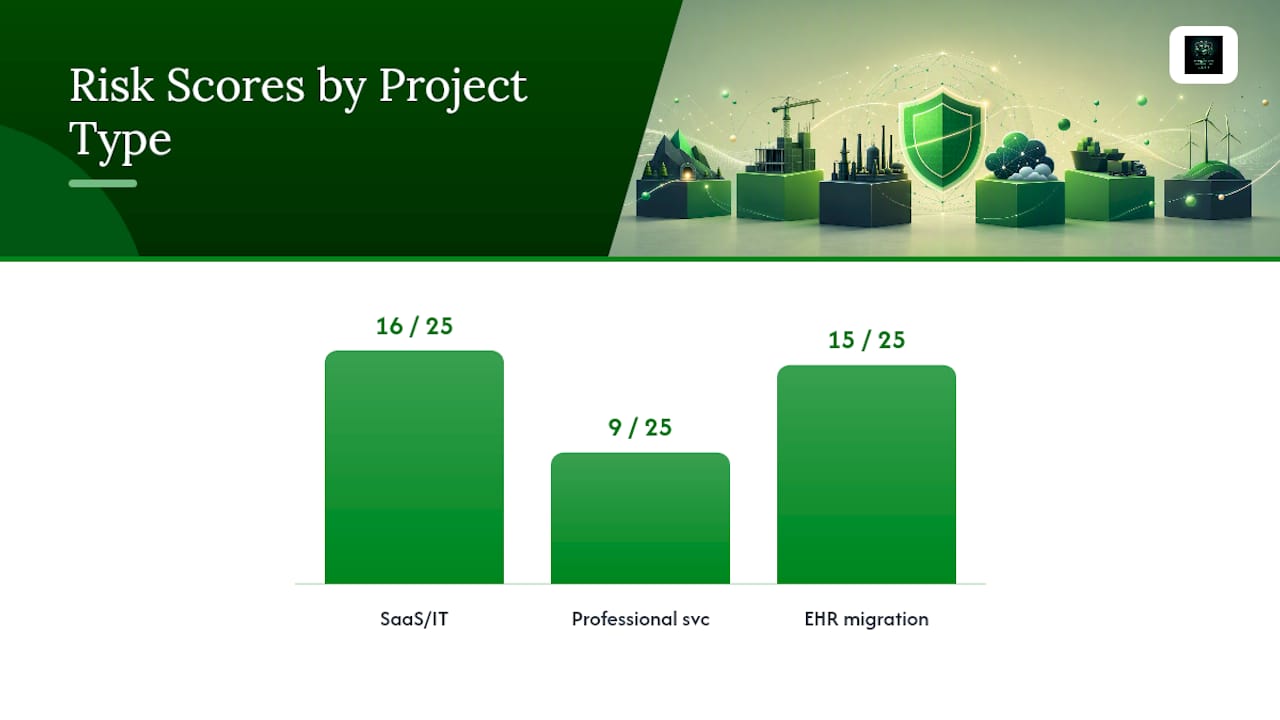
Reading about fields is one thing. Seeing a fully populated row is what actually shows you how the pieces fit together. Below are six realistic entries drawn from common project types, each with rationale for the scoring and owner assignment attached. Adapt the wording, keep the structure.
1. SaaS/IT implementation
- Risk ID: R012
- Description: If the vendor delays API documentation past the sprint 3 deadlines, then integration testing slips two weeks and go-live risks missing the fiscal quarter close.
- Category: Technical/Vendor
- Likelihood: 4 (High)
- Impact: 4 (High)
- Score: 16
- Owner: Integration Lead, Sarah Chen
- Mitigation: Weekly vendor sync calls; escalation clause invoked at day 10 of delay.
- Contingency: Fall back to manual data entry for the first billing cycle if API isn't ready.
- Status: Monitoring
- Review date: Every Friday until resolved
The score of 16 out of a possible 25 sits high enough to warrant a named owner with weekly check-ins rather than a monthly mention in a status report.
2. Professional services engagement
- Risk ID: R007
- Description: If the client's subject-matter expert is unavailable for scheduled interviews, then discovery phase extends by one to two weeks, delaying the fee-based deliverable timeline.
- Category: Resourcing/Client-side
- Likelihood: 3 (Medium)
- Impact: 3 (Medium)
- Score: 9
- Owner: Engagement Manager
- Mitigation: Confirm SME availability in writing before kickoff; build a two-week buffer into the statement of work.
- Contingency: Substitute a secondary SME or shift to document review in place of live interviews.
- Status: Open
- Review date: At each biweekly steering call
3. IT infrastructure / EHR migration
- Risk ID: R003
- Description: If patient record migration to the new EHR platform introduces data mapping errors, then clinical staff may access incomplete records during the go-live window.
- Category: Data integrity/Regulatory
- Likelihood: 3 (Medium)
- Impact: 5 (Severe, HIPAA exposure)
- Score: 15
- Owner: Clinical Systems Director
- Mitigation: Run parallel record validation for 500-record sample before full cutover; independent QA sign-off required.
- Contingency: Maintain read-only access to legacy system for 30 days post-migration.
- Status: Monitoring
- Review date: Weekly through go-live, then monthly
Notice the impact rating here outweighs likelihood. A moderate-probability event with regulatory exposure earns a higher score than a more likely but lower-consequence risk elsewhere in the same register.
4. Construction project
- Risk ID: R019
- Description: If structural steel delivery is delayed beyond the June 15 milestone, then the framing crew sits idle and the project incurs $18,000 in weekly labor holding costs.
- Category: Supply chain
- Likelihood: 3 (Medium)
- Impact: Monetary exposure, $18,000/week
- Score: High priority (monetary threshold exceeded)
- Owner: Procurement Manager
- Mitigation: Secondary supplier identified and pre-qualified; deposit paid to hold capacity.
- Contingency: Resequence schedule to prioritize interior work while awaiting delivery.
- Status: Open
- Review date: Bi-weekly during procurement window
This entry uses dollar exposure instead of a 1-to-5 score, a common adaptation once a risk's cost is easier to quantify than its probability alone.
5. Regulatory/compliance project
- Risk ID: R002
- Description: If the SOC 2 audit evidence collection is not complete by the auditor's cutoff date, then certification is delayed past the client renewal deadline.
- Category: Regulatory
- Likelihood: 2 (Low)
- Impact: 5 (Severe, revenue-linked)
- Score: 10
- Owner: Compliance Program Lead
- Mitigation: Evidence collection tracker reviewed weekly; automated reminders at 30/15/5 days out.
- Contingency: Request auditor extension with documented remediation plan.
- Status: Monitoring
- Review date: Weekly, escalates to daily inside final 30 days
6. Simple small-project example
- Risk ID: R001
- Description: If the freelance designer is unavailable during week two, then the marketing asset delivery slips by three to five days.
- Category: Resourcing
- Likelihood: Medium
- Impact: Low
- Score: Medium
- Owner: Project Coordinator
- Mitigation: Confirm availability calendar upfront.
- Contingency: Shift asset delivery order to prioritize non-blocking items first.
- Status: Open
- Review date: Next weekly check-in
Small projects rarely need numeric scoring at all. A qualitative Low/Medium/High call, made consistently, does the same sorting job with far less overhead.
The NIST-Aligned Cybersecurity Register Pattern
Cybersecurity risks carry a documentation burden that most project risks don't: auditors, regulators, and cyber insurers all want to see the evidence behind a score, not just the score itself. That's the exact problem the NIST IR 8286B guidance solves with its Concise Statement Risk Register and Risk Detail Record architecture.
The split works like this: the CSRR is a compact, one-row-per-scenario summary meant for governance conversations, board reporting, and quick prioritization. Each CSRR row then links to a Risk Detail Record, a separate document that holds the technical analysis, evidence, and full response history an auditor would actually want to inspect.
What stays in the CSRR:
- Risk ID and short scenario name
- Category and affected business function
- Likelihood, impact, and score
- Risk owner
- Current status and response type (accept, avoid, transfer, mitigate)
- A link or reference number pointing to the full RDR
What lives in the RDR instead:
- Business and technical context for the scenario
- Detailed threat and vulnerability analysis
- Control mappings and testing results
- Evidence artifacts (scan reports, pen test findings, log excerpts)
- Cost and effort estimates for the chosen response
- Full history of status changes and decisions
Here's a sample populated CSRR row:
The linked RDR-2026-014 would contain the specific CVE identifier, the affected concentrator models, penetration test findings confirming exploitability, the patch rollout plan with target dates, and the labor cost estimate for emergency remediation versus scheduled maintenance. NIST's own guidance on separating claimed risk from measured risk and executed treatment reinforces why this split matters: a board member scanning the CSRR gets a decision-ready snapshot in seconds, while the security team retains full audit traceability without cluttering the executive view.
This pattern earns its complexity once an organization is managing dozens of concurrent technical risks against frameworks like SOC 2, HIPAA, or CMMC, where an auditor will eventually ask "show me the evidence" for any row you've marked as mitigated. Below that scale, a lighter-weight version of the same split, even just a summary tab and a detail tab in one spreadsheet, keeps most of the benefit. Reviewing how a NIST Risk Management Framework engagement structures this reporting layer is a useful next step for teams scaling past a spreadsheet.
Scoring and Prioritizing Risks the Right Way
A risk register without a consistent scoring method is just a list of worries. Scoring turns that list into something you can sort, fund, and defend to a steering committee.
The most common approach multiplies likelihood by impact, each rated on a 1 to 5 scale, producing a score from 1 to 25. Some teams substitute Low/Medium/High labels for simplicity, which works fine for small projects but loses precision once you need to rank twenty or more risks against each other. Larger programs, especially in construction and infrastructure, often switch to monetary exposure instead: expected cost times probability of occurrence, which translates naturally into budget conversations.
Whichever scale you choose, apply it the same way across every row. A register where one risk owner scores generously and another scores conservatively produces a prioritization list that misleads everyone reading it.
Set explicit thresholds rather than relying on gut feel:
- High scores get weekly owner check-ins and appear on the executive dashboard by name.
- Medium scores get biweekly or monthly review and are tracked but not escalated unless they trend upward.
- Lower scores stay on a watch list, reviewed at the standard program cadence.
- Any risk tied to regulatory deadlines or safety gets a business-impact override, regardless of its numeric score, because the consequence type outranks pure probability math.
Pro Tip: Build one aggregation view that rolls individual scores up into category totals. Executives rarely want to see forty individual rows. They want to know that "vendor risk" as a category jumped from a combined score of 40 to 65 this quarter.
Review cadence should scale with volatility, not calendar convenience. Active project risks need weekly attention because conditions change fast. Program-level or strategic risks move slower and hold up fine on a monthly cycle. But any incident that crosses a predefined severity threshold, a confirmed data breach, a missed regulatory filing, a structural failure, triggers immediate escalation outside the normal review rhythm. Building that trigger into the register upfront, rather than deciding in the moment, is what keeps a genuine emergency from getting stuck in next Tuesday's status meeting.
How to Build a Risk Register From Scratch
Building your first register, or fixing one that's stopped getting used, follows a repeatable sequence. Here's the checklist.
-
Define scope and map assets. Decide whether the register covers one project, one department, or the whole organization, then list the specific assets, processes, or deliverables in scope. A register with unclear boundaries collects risks that don't belong together and becomes impossible to prioritize.
-
Choose the minimal template that fits your scale. A five-person marketing project needs the lightweight six-field sheet. A multi-vendor infrastructure program needs full likelihood/impact scoring. A compliance-driven security program needs the CSRR/RDR pattern. Picking a heavier template than you need is the single most common reason registers get abandoned after month one.
-
Run an identification workshop. Pull in the people closest to the work, not just leadership, and walk through each phase or asset asking "what could go wrong here, and what would that cost us?" Document every answer as an "If X, then Y" statement before anyone starts scoring.
-
Assign a real owner to every risk. Not a team, not "IT," a named person. If nobody in the room will claim ownership of a risk, that's itself a signal the risk needs escalation to someone with the authority to own it.
-
Score, schedule, and build your dashboard view. Apply your chosen scale consistently, set the first review date for every row, and build one simple sorted view, even a pivot table, that shows risks ranked by score for quick scanning.
-
Assign one person to maintain the register itself. Not the risks, the document. Someone needs to own version control, chase overdue reviews, and make sure closed risks actually get marked closed instead of quietly forgotten.
-
Put the register on a standing meeting agenda. Five minutes at the start of every project or program meeting, reviewing only risks that changed status or crossed a threshold since last time, keeps the document alive instead of becoming an artifact nobody opens between audits.
Teams that skip step six most often. A register with no single owner slowly turns into six different half-updated copies floating around in email threads, which defeats the entire purpose of having one authoritative source. Tools built for risk mitigation tracking can help enforce that single-source discipline once a spreadsheet stops scaling.
Templates and Downloads to Start From
Three starter formats cover almost every situation you'll run into.
- Light six-field sheet: Risk ID, description, category, likelihood, impact, owner. Best for small projects, internal initiatives, or teams running their first register and needing something they'll actually keep updated.
- Scored project register: Adds score, mitigation, contingency, status, and review date to the six-field base. This is the standard for delivery programs, IT implementations, and construction projects where you need to rank risks against each other. The populated examples above follow this format.
- CSRR + RDR pair: A compact governance summary linked to detailed evidence records, built for cybersecurity and regulated programs where audit traceability matters as much as prioritization.
For a ready-made spreadsheet with built-in field instructions, the UCOP risk register template is a solid starting point, and teams wanting a NIST-aligned build without spreadsheet setup can use Open Risk Register, a free browser tool that walks through scope, threat identification, and scoring, then exports a finished register.
For version control, keep a simple changelog tab noting who edited what and when, rather than relying on file names like "register_final_v3." For audit exports, always export to PDF with a timestamp before a compliance review, so you have a defensible snapshot even if the live sheet changes afterward. Spreadsheets work fine until you're managing risks across multiple teams simultaneously; at that point a lightweight security template or a purpose-built platform starts paying for itself in reduced version-control headaches.
Common Risk Categories Worth Standardizing
Consistent categories are what let you aggregate risks across teams and actually compare them at the portfolio level.
- Technical: A legacy system integration fails under production load.
- Financial: Currency fluctuation increases contracted vendor costs by 12%.
- Regulatory: A new state privacy law requires unplanned data-handling changes.
- Operational: Key staff turnover disrupts a process with no documented backup.
- Third-party/vendor: A critical supplier misses a delivery deadline.
- Cybersecurity: An unpatched system is exposed to a known exploit.
- Reputational: A public incident damages client trust ahead of contract renewal.
- Schedule: A dependency slips, cascading delays through downstream tasks.
Regulatory and cybersecurity risks usually need faster escalation paths than the others, since deadlines and exploit windows don't wait for the next monthly review. Tailor this list to whatever taxonomy your organization already reports against; consistency across teams matters more than matching any external example exactly.
A vCISO's Take on What Teams Get Wrong
Most cybersecurity risk registers fail for one of two reasons: they're too thin to survive an audit, or too bloated to survive daily use. Teams either log "ransomware risk" with no owner and no evidence trail, or they build a fifty-column monster nobody updates past week three.
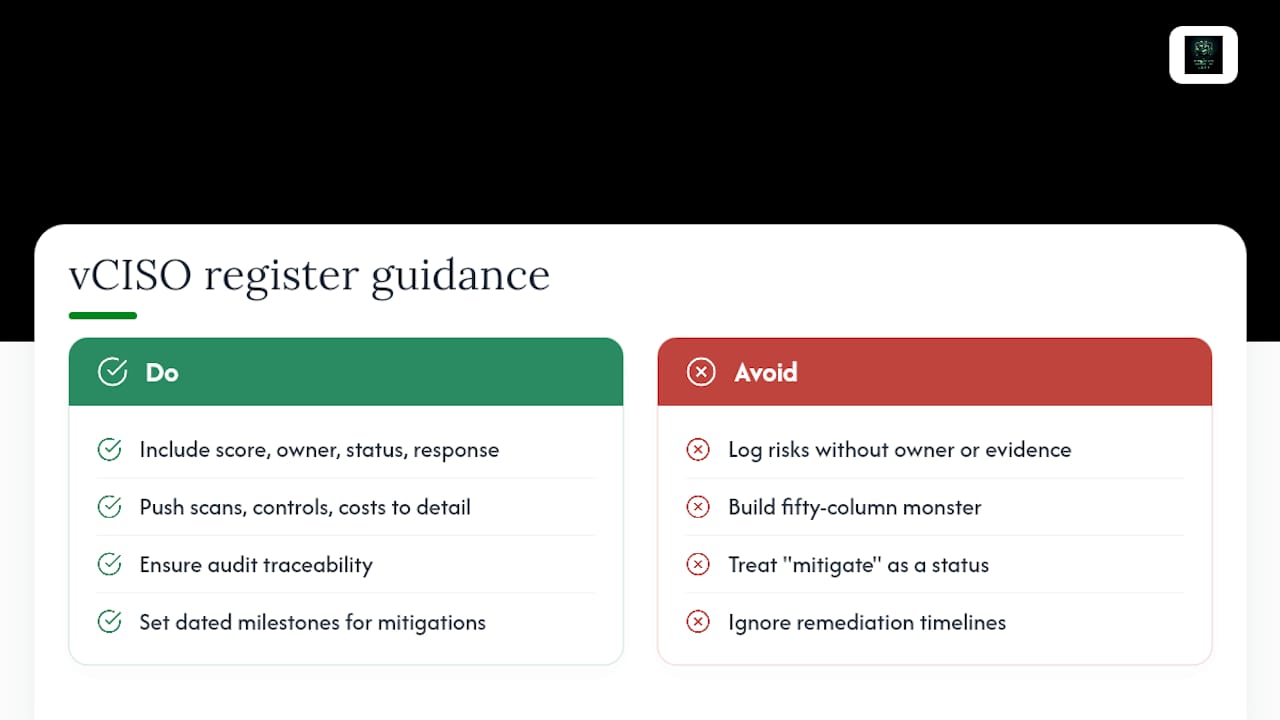
The fix isn't a bigger template. It's the CSRR/RDR split done properly. Keep the summary row to what a board member needs in ten seconds: score, owner, status, response type. Push everything else, the vulnerability scan output, the control mapping, the remediation cost breakdown, into the linked detail record. Auditors want traceability, not a wall of columns in the same view leadership uses for prioritization.
The other mistake worth naming: treating "mitigate" as a status instead of a plan. A risk marked "mitigating" for six straight months with no dated milestone isn't being managed, it's being ignored with better paperwork. If your organization doesn't have the internal bandwidth to keep that discipline going, that's exactly the gap a vCISO engagement is built to close.
— vCISO
Managed Support for Audit-Ready Risk Registers
Building a compliant CSRR/RDR register in-house takes real time, especially if your team is already stretched thin managing the risks themselves rather than documenting them. Specialized vCISO services can close that gap with security assessments, RDR construction with technical evidence attached, and reporting formatted for SOC 2, HIPAA, and CMMC readiness reviews.
The decision to hire a vCISO versus building internally usually comes down to audit timeline and internal capacity. If you have a certification deadline in the next two quarters and no dedicated security staff, an outside vCISO can stand up a working register faster than a from-scratch internal build. If you're managing dozens of vendor relationships, a third-party risk overview is worth reviewing alongside your own register to make sure vendor-related rows aren't getting overlooked. For organizations that want a professional health check on an existing register or a fully managed engagement, CisoSafe's vCISO team can assess your current setup and tell you exactly what's audit-ready and what isn't.
Sources
- Prioritizing Cybersecurity Risk for Enterprise Risk Management (NIST IR 8286B-upd1)
- Monday
- Risk Register Example: A Practical Template With Real Project Entries (ProjectManagementFormula)
- Open Risk Register