

Brokered, zero trust remote access with just-in-time sessions beats always-on VPNs for operational technology environments. The safest architecture pairs multi-factor authentication, role-based access, session recording, and network segmentation built around IEC 62443 zones and conduits. Move from flat VPN tunnels to identity-verified, time-limited sessions in phases, starting with your highest-risk vendor connections, so plant operations never stop while security catches up.
TL;DR:
- Moving from flat VPN tunnels to identity-verified, time-limited sessions significantly reduces risk by preventing permanent access for attackers and enabling session recording.
- Implementing multi-factor authentication, strict role-based access, and continuous verification aligns with IEC 62443 standards and enhances overall OT security.
- Building effective zones and conduits controls requires detailed asset grouping and strict documentation of communication paths to limit attack surfaces.
- Managing vendor access through scoped, time-limited sessions with full logging and approval workflows prevents common breakdowns in third-party remote access programs.
- A phased, risk-based migration that starts with high-risk connections and ensures proper planning, rollback options, and operator communication minimizes operational disruptions.
Table of Contents
- What Is Secure Remote Access for OT, and Why Does VPN Fail?
- How Do You Enforce Zero Trust for Remote OT Access?
- Where Do Zones and Conduits Fit in OT Network Protection?
- How Should You Manage Vendor and Third-Party OT Access?
- What Protocol and Device-Level Controls Does OT Need?
- What Logging and Monitoring Does Remote OT Access Require?
- How Do You Roll Out Secure Remote Access Without Disrupting Operations?
- How CisoSafe Supports Secure Remote Access Programs
- Practitioner Lessons and Common Pitfalls
- Get Vendor Access and Segmentation Built Right the First Time
- Sources
- FAQ
What Is Secure Remote Access for OT, and Why Does VPN Fail?
Secure remote access for OT means letting engineers, vendors, and integrators reach industrial control systems without giving attackers a permanent doorway into the plant floor. That sounds like what a VPN already does. It isn't, and the gap between the two is where most OT breaches start.
A standard VPN grants network-level access. Once a credential connects, the device often sits on the same routable segment as programmable logic controllers, historians, and human machine interfaces. CISA-aligned guidance treats that kind of flat access as the core weakness behind recent OT intrusions, calling for identity-based access, MFA on every remote path, and jump-host mediation instead of shared network reachability.
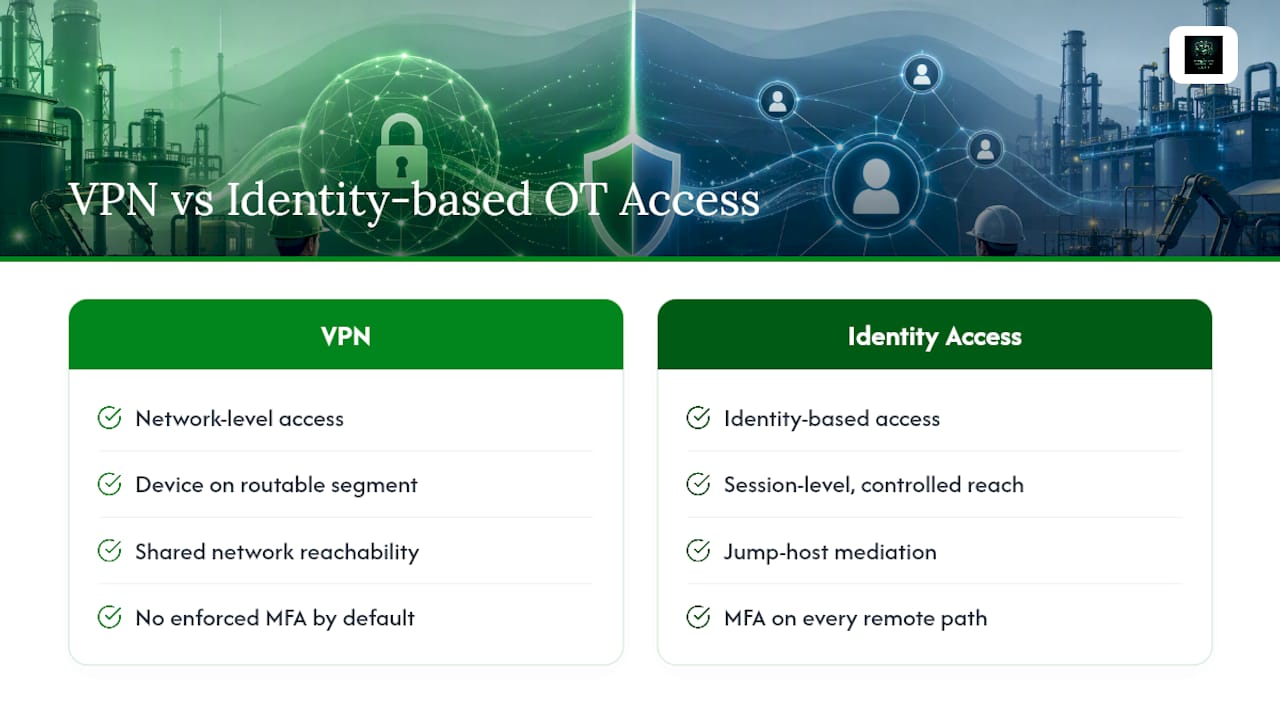
VPN vs. brokered gateway vs. hybrid
Three architecture patterns dominate industrial remote access security conversations right now, and each fits different risk tolerances.
- Always-on VPN: Fast to deploy but carries standing credentials, often shared among contractors, with no session-level audit trail and direct network reachability into the OT VLAN.
- Brokered or cloud gateway access: Proxies the session so the remote device never gets a routable IP inside OT, issues just-in-time credentials, and records everything. This model directly addresses the VPN failure modes that plague legacy remote access.
- On-prem jump host: Keeps control local, which some operators prefer for latency-sensitive processes, but requires more hands-on patching and lacks the elastic session logging a cloud broker provides.
- Hybrid model: Cloud-brokered identity and approval workflows paired with an on-prem proxy for the actual OT connection, useful when regulatory or network isolation requirements block direct cloud reachability to control systems.
Choose a hybrid model when you have latency-critical processes (sub-second control loops) that can't tolerate a cloud round trip, but you still want centralized security and compliance governance. Choose a pure cloud gateway when your sites are geographically distributed and you need one console for vendor access across dozens of plants. A read-only cloud connection for monitoring dashboards, separate from any control-capable session, keeps that trade-off manageable.
How Do You Enforce Zero Trust for Remote OT Access?
Zero trust for OT isn't a product category. It's a set of identity and access controls applied consistently across every remote path into the environment, verified continuously rather than trusted once at login.
- Require MFA on every remote path, with no exceptions for "trusted" vendors or legacy accounts. Phishing-resistant factors, such as hardware security keys or certificate-based authentication, beat SMS or app-based codes for accounts with control-system reach.
- Separate your OT identity domain from corporate IT, or apply conditional access policies that treat OT-bound credentials as a distinct risk tier requiring additional verification.
- Enforce role-based access control with strict separation between read-only monitoring roles and control-capable roles. A vendor troubleshooting a sensor should never inherit write access to a PLC by default.
- Integrate single sign-on using SAML or OIDC for centralized identity federation, then vault short-lived credentials so no one ever memorizes or reuses a standing password into OT.
- Standardize on privileged access workstations for anyone with control-system access, and manage credential lifecycle so stale accounts get revoked automatically, not manually, months later.
Pro Tip: Audit your vendor credential list before you build anything new. Most OT teams find at least one shared account that's been active for years with no owner and no expiration date. Kill those first. It's the fastest risk reduction you'll get all quarter.
These controls map cleanly to IEC 62443-3-3 requirements for identification, authentication, and use control, which matters when an auditor asks how your remote access program satisfies a named standard rather than a vague internal policy.
Where Do Zones and Conduits Fit in OT Network Protection?
Zones and conduits give you a structured way to answer a question every OT security manager eventually faces: what exactly is allowed to talk to what, and why? IEC 62443 defines a zone as a grouping of assets with shared security requirements, and a conduit as the sanctioned communication path between zones.
Building this out is less abstract than it sounds. Start by grouping assets into zones based on function and risk. Then enumerate every conduit that crosses a zone boundary.
- Define each zone by its security requirement level, separating safety-critical control systems from supervisory and business networks.
- For every conduit, document source, destination, protocol, direction, and authentication method. If you can't fill in all five fields, the conduit probably shouldn't exist.
- Map each conduit to a firewall rule, placing vendor gateways and jump hosts inside a DMZ rather than directly on the OT network.
- Use data diodes or unidirectional gateways where data only needs to flow one way, such as historian exports to a cloud analytics platform.
- Separate Active Directory forests and DNS zones between IT and OT so a compromised corporate domain controller can't cascade into control systems.
CISA-aligned advisories single out the IT/OT boundary as the highest-value place to deploy network taps and centralize logging, because it gives visibility and enforcement without touching fragile field devices. That single boundary, done right, closes off more attack paths than a dozen device-level patches. Our zones-and-conduits blueprint walks through conduit mapping in more detail for teams building this out from scratch.
How Should You Manage Vendor and Third-Party OT Access?
Third-party access is where most OT remote access programs actually break down, not because the technology fails but because the process around it never got built. Vendors need access on their schedule, not yours, and if the secure path is slower than a shared VPN credential, someone will find a workaround.
- Inventory every vendor connection currently active, ranked by the criticality of the systems each one can reach. A calibration contractor touching a single sensor carries different risk than an integrator with historian-wide access.
- Route every vendor session through a broker or gateway that handles the full workflow: a request, an internal approval, a scoped and time-boxed session, and automatic expiry when the work is done.
- Turn on session recording and live monitoring so plant security can watch active vendor sessions in real time and terminate one immediately if something looks wrong. Session recording and live monitoring are what turn vendor access from a trust exercise into an auditable control.
- Keep recordings for audits. When a compliance reviewer asks how a contractor's remote session was scoped and monitored six months ago, a recording answers that question in minutes instead of days.
Pro Tip: Some vendors will push back and insist on their own VPN client. Don't cave just because it's the path of least resistance. Ask for their supplier risk documentation and offer the broker portal as a faster, single-sign-on alternative to managing yet another VPN credential on their end. Most vendors switch once they realize the broker is less work, not more.
What Protocol and Device-Level Controls Does OT Need?
Segmentation and identity controls protect the network layer, but the protocols running inside that network need their own hardening, especially with OPC UA and MQTT becoming standard in modern industrial deployments.
- Require certificate-based authentication for OPC UA connections rather than relying on network location as a proxy for trust.
- Enable TLS 1.2 or higher for MQTT brokers and any protocol carrying telemetry off the plant floor, a baseline industrial remote access security guidance treats as non-negotiable.
- Wrap legacy protocols like Modbus or DNP3, which lack native encryption, at the gateway rather than trying to retrofit encryption onto the device itself.
- Use a secrets management platform for device credentials and database accounts, and eliminate root or default accounts wherever the device supports it.
- Favor read-only cloud connections and edge computing for analytics workloads, keeping control-capable sessions isolated from monitoring traffic entirely.
Because active scanning and aggressive patching can destabilize sensitive OT devices, passive monitoring and risk-based vulnerability management fit the protocol layer better than the active testing approaches common in IT security.
What Logging and Monitoring Does Remote OT Access Require?
Every remote session into OT needs to leave a trail someone can actually use during an incident, not just a login timestamp buried in a system you never check.
- Log authentication events, full session metadata, and every proxy action taken at the gateway level.
- Store logs off the originating device in a tamper-resistant location, retained according to whatever compliance framework governs your industry.
- Feed OT remote access telemetry into your SIEM or SOAR platform, with alerts tuned to flag genuinely abnormal behavior rather than every routine login.
- Run tabletop exercises that simulate a compromised vendor session or a break-glass emergency access event, so your team knows the response steps before a real incident forces them to improvise.
A jump host or broker that logs every command isn't overhead. It's the single piece of evidence that turns "we think a vendor caused this" into a documented, defensible timeline during an actual incident review.
How Do You Roll Out Secure Remote Access Without Disrupting Operations?
A phased rollout keeps plant operations running while you systematically retire risky access paths, and sequencing the migration around your worst offenders first limits disruption during the transition.
- Phase 0, discovery (weeks 1 to 4): Build a complete inventory of every remote access path, every credential, and every vendor connection currently in use, including the shadow VPN accounts nobody remembers creating.
- Phase 1, quick wins (weeks 4 to 10): Apply a broker to your highest-risk connections first, typically the always-on VPNs with shared credentials, and turn on MFA and session logging immediately.
- Phase 2, segmentation and pilots (months 3 to 6): Enforce zones and conduits, separate OT identity from corporate IT, and pilot the new vendor workflow with two or three cooperative suppliers before requiring it plant-wide.
- Phase 3, full migration (months 6 to 12): Retire remaining standing VPNs, expand broker coverage across all sites, and validate the new architecture with an internal audit and formal vendor onboarding process.
Pro Tip: Keep a documented rollback plan for every phase, and communicate the change to plant operators before you flip any switch. A pilot that fails silently because nobody warned the night shift will cost you more trust than the security gap you were trying to close.
How CisoSafe Supports Secure Remote Access Programs
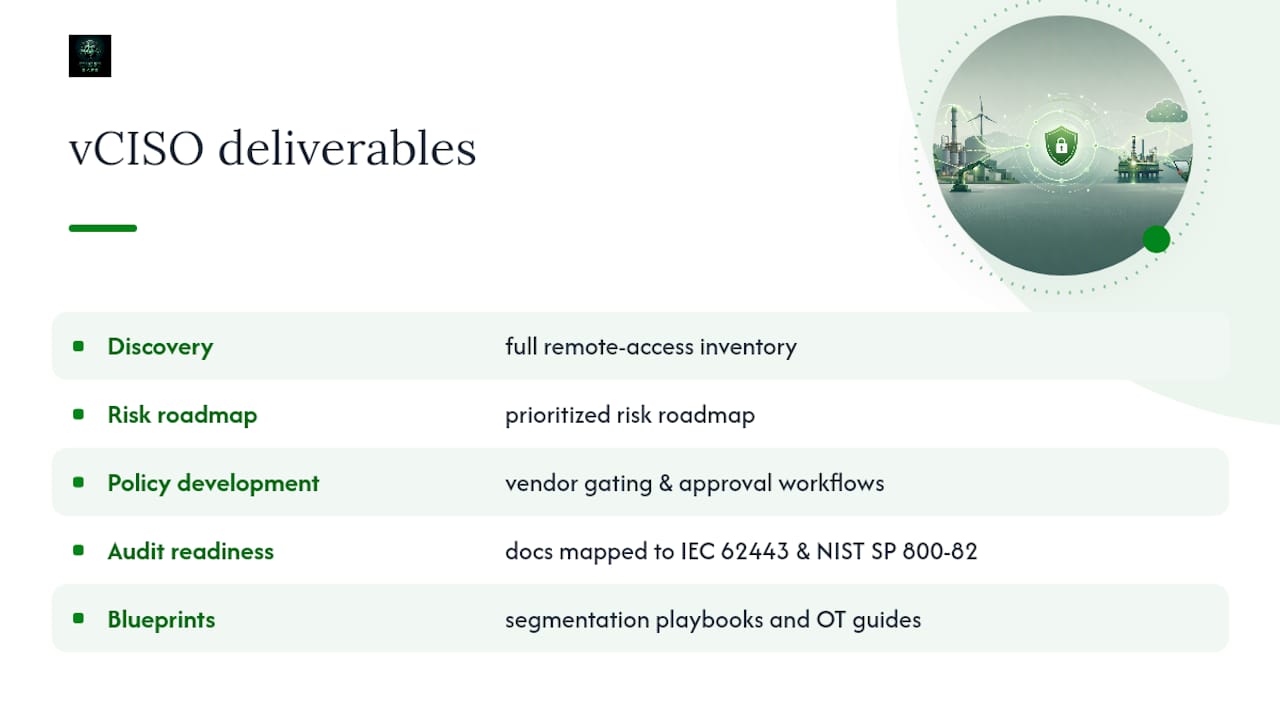
Building this out alone, on top of daily operations, is where most OT security programs stall. CisoSafe's vCISO engagements handle the parts that require sustained attention: a full discovery of your remote access inventory, a prioritized risk roadmap, policy development for vendor gating and approval workflows, and audit readiness documentation mapped to frameworks like IEC 62443 and NIST SP 800-82.
Practical blueprints, including segmentation playbooks and OT cybersecurity guides, are available for regulated organizations needing to show auditors a defensible, standards-aligned remote access program rather than an informal patchwork of VPN credentials and good intentions.
Practitioner Lessons and Common Pitfalls
The recurring failures aren't exotic: expired shared credentials nobody revoked, missing session logs, and Active Directory leakage between IT and OT. Fix operator buy-in with small, reversible pilots. Get vendor terms in writing before you switch tools.
— vCISO
Get Vendor Access and Segmentation Built Right the First Time
This service is a practical alternative to hiring a full-time OT security architect or a large consultancy to run this migration for you. Where a generic IT security vendor sells you a broker product and walks away, this vCISO team builds the discovery inventory, writes the vendor access policy, and stays through the phased rollout, so the segmentation work and the audit documentation actually match what auditors expect from IEC 62443 and NIST SP 800-82.
If your organization is still running standing VPN credentials into control systems, or you're not sure your current vendor access process would survive an audit, these OT security engagements can help close that gap. Start with a discovery assessment to map every remote access path, every vendor credential, and every segmentation gap before you commit to a specific architecture, and get a prioritized roadmap you can actually execute in phases without shutting down plant operations.
Sources
- Best practices for secure industrial remote access — Inductive Automation
- Replacing VPN Access to OT: A Zero-Trust Migration Guide – MES Engineer
- OT Network Security in a Changing Threat Landscape | Dragos
FAQ
What Is the Difference Between VPN and Brokered OT Access?
A VPN grants network-level reachability into OT with standing credentials, while brokered access proxies each session with just-in-time credentials, no routable IP on the OT VLAN, and full session recording.
Does Zero Trust Mean No VPN at All?
Zero trust means no implicit trust, not necessarily zero VPN usage. Most organizations replace always-on VPN tunnels with brokered, identity-verified sessions while retaining VPN infrastructure only for narrowly scoped, monitored use cases.
How Does IEC 62443 Relate to Remote Access?
IEC 62443 defines zones-and-conduits segmentation and identification and use-control requirements that map directly onto brokered access, MFA, and session monitoring for OT remote access.
Can CisoSafe Help With Vendor Access Policies?
Yes. CisoSafe's vCISO engagements build vendor access inventories, approval workflows, and audit-ready documentation aligned to IEC 62443 and NIST SP 800-82 for regulated industrial organizations.
How Long Does a Secure Remote Access Migration Take?
A phased migration typically runs from initial discovery in the first month through full VPN retirement and validated audits within 6 to 12 months, depending on the number of sites and vendor connections involved.