

The HIPAA Security Rule requires covered entities and business associates to protect electronic protected health information (ePHI) through documented administrative, physical, and technical safeguards, as codified under 45 CFR Part 160 and Part 164, Subparts A and C (specifically §164.306, §164.308, and §164.312). The Rule does not prescribe specific technologies. It demands that organizations assess their own risk environment and implement controls that are reasonable and appropriate for their size and complexity. For operational implementation, most compliance teams follow NIST SP 800-66 Rev. 2, which frames HIPAA compliance as a continuous risk management process, not a one-time project.
Key Takeaways
Documented risk management, executive governance, and tested controls are the three pillars that determine whether a HIPAA Security Rule program survives OCR scrutiny.
| Point | Details |
|---|---|
| Appoint a Security Official | Designate this role in writing and give them executive access and authority within 30 days. |
| Run a documented risk analysis | Cover all ePHI assets, threats, and vulnerabilities; update it after any significant operational change. |
| Address addressable specifications | Document your decision for every addressable item, whether you implement it or choose an equivalent alternative. |
| Test your contingency plan | An untested disaster recovery plan is a recurring OCR finding; schedule and document exercises annually. |
| Review all BAAs | Audit your vendor list at least annually and execute BAAs with every business associate that touches ePHI. |
| CisoSafe for HIPAA programs | CisoSafe delivers vCISO-led risk analyses, policy development, and audit-ready documentation for US healthcare organizations. |
Table of Contents
- Who does the HIPAA Security Rule apply to?
- What are the three HIPAA safeguard categories?
- Administrative safeguards: governance and risk management under §164.308
- How do technical safeguards work under §164.312?
- Physical safeguards: facility, device, and media controls
- How to run a continuous, NIST-informed risk analysis
- Common compliance failures and what OCR looks for
- Scalable HIPAA compliance for small practices
- When should you engage a vCISO or compliance firm?
- A vCISO's perspective on what actually matters
- CisoSafe delivers HIPAA compliance without the overhead of a full-time CISO
- Sources
Who does the HIPAA Security Rule apply to?
The Rule covers two categories of organizations and a specific class of data.
Covered entities include:
- Health plans (insurers, HMOs, employer-sponsored plans)
- Healthcare clearinghouses
- Healthcare providers who transmit health information electronically (virtually every provider today)
Business associates (BAs) are vendors, contractors, or service providers that create, receive, maintain, or transmit ePHI on behalf of a covered entity. Cloud storage vendors, billing companies, EHR hosting providers, and managed IT firms all typically qualify. Under §164.314, covered entities must obtain written business associate agreements (BAAs) from each BA, and BAs must obtain BAAs from their own subcontractors.
ePHI is individually identifiable health information stored or transmitted in any electronic form, including data at rest on servers, data in transit over networks, and data on mobile devices. Paper records and verbal communications fall under the Privacy Rule, not the Security Rule. The Security Rule, Privacy Rule, and Breach Notification Rule work together: the Privacy Rule governs what PHI can be used or disclosed; the Security Rule governs how ePHI must be protected; the Breach Notification Rule governs what happens when protection fails.
What are the three HIPAA safeguard categories?
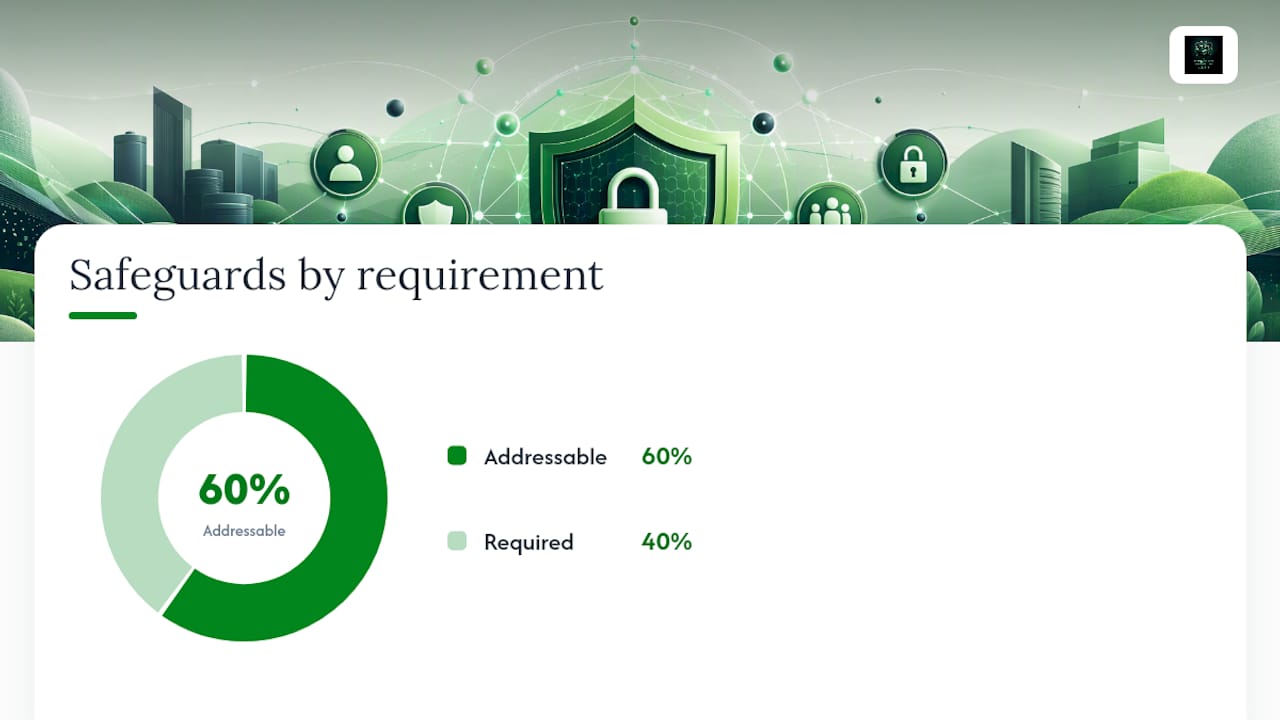
The Rule organizes all requirements into three safeguard categories. Each contains both required implementation specifications (mandatory) and addressable ones (must be implemented or documented with a justified alternative).
| Safeguard Category | Core Focus | Example Control |
|---|---|---|
| Administrative | Policies, governance, risk management | Annual risk analysis with documented remediation plan |
| Physical | Facility and device protection | Badge-controlled server room access; locked workstations |
| Technical | Technology controls for ePHI access and transmission | Role-based access controls in EHR; TLS encryption for email |
The Rule is intentionally technology-neutral and scalable. A 3-physician practice and a 500-bed hospital system both must comply, but what is "reasonable and appropriate" differs significantly between them.
Administrative safeguards: governance and risk management under §164.308
§164.308 is the most documentation-intensive section of the Security Rule. It requires six core functions.
1. Risk analysis and risk management
Your risk analysis must be accurate, thorough, and documented. At minimum, it should cover:
- Inventory all systems, applications, and devices that store or transmit ePHI
- Identify threats and vulnerabilities for each asset
- Assess the likelihood and potential impact of each threat-vulnerability pair
- Document current controls and calculate residual risk
- Prioritize risks and build a remediation roadmap
- Review and update the analysis when technology, operations, or the threat environment changes
Risk management means acting on that analysis: selecting controls, documenting why each was chosen (or why an addressable specification was not implemented), and tracking remediation to closure.
2. Assigned security responsibility
Designate a Security Official in writing. This person owns the security program and reports to executive leadership. For small practices, this is often the practice manager or a contracted vCISO.
3. Workforce security and sanctions
Screen workforce members who access ePHI, define access levels by role, and maintain a written sanction policy. When a workforce member violates security policy, the sanction policy must be applied consistently and documented.
4. Security awareness training
Training must be ongoing, not a one-time onboarding event. Log completion dates, topics covered, and attestations. Security awareness for clinical and administrative staff should address phishing, password hygiene, and device handling. For organizations with field or remote workers, practical security awareness programs that address real-world scenarios are far more effective than generic slide decks.
5. Contingency planning
Maintain a data backup plan, disaster recovery plan, and emergency mode operation plan. Test them. OCR frequently finds that contingency plans exist on paper but have never been exercised.
6. Periodic evaluation
Conduct a formal evaluation whenever significant operational or environmental changes occur, and at least annually. Document the evaluation and any resulting updates to policies or controls.
Pro Tip: Version every policy document and risk analysis artifact. Store them with a date stamp, author, and approval signature. OCR expects to see a clear audit trail showing that governance decisions were made deliberately and reviewed over time.
Roles and responsibilities at a glance:
| Role | Primary Responsibility | Frequency |
|---|---|---|
| Security Official | Own risk analysis, policy updates, incident response | Ongoing |
| Executive Leadership | Approve risk decisions, fund remediation | Quarterly review |
| IT / Systems Admin | Implement technical controls, maintain audit logs | Ongoing |
| Privacy Officer | Coordinate with Security Official on PHI handling | As needed |
| Compliance Officer | Track remediation, maintain evidence package | Ongoing |
A realistic timeline for an initial program: 30 days to complete the risk analysis and gap assessment; 60 days to finalize policies, assign ownership, and begin remediation of critical gaps; 90 days to complete BAA reviews, deliver initial workforce training, and test the contingency plan.
How do technical safeguards work under §164.312?
§164.312 defines four technical safeguard standards. The HHS technical safeguards guidance clarifies that these standards define what must be protected, not which specific technology to use.
- Access controls (required): Assign each user a unique identifier. No shared logins. Configure role-based access in your EHR so clinical staff see only the records relevant to their function. Emergency access procedures must be documented and tested separately from normal access paths.
- Automatic logoff (addressable): Configure workstations and EHR sessions to time out after a defined period of inactivity. For telehealth providers and remote workers, this applies to any device accessing ePHI.
- Audit controls (required): Log who accessed what ePHI, when, and from where. Retain logs long enough to support incident investigation. Review logs regularly, not just after a suspected breach.
- Integrity controls (addressable): Use checksums, digital signatures, or file integrity monitoring to detect unauthorized alteration of ePHI.
- Transmission security and encryption (addressable): Encrypt ePHI in transit using TLS 1.2 or higher for web applications and email. Encryption is addressable, meaning you must either implement it or document a justified reason for not doing so. In practice, any organization transmitting ePHI over public networks should treat encryption as effectively required.
Pro Tip: For email containing ePHI, use a HIPAA-compliant encrypted email gateway such as Proofpoint or Mimecast rather than standard SMTP. For cloud-hosted EHR data at rest, confirm with your vendor that AES-256 encryption is applied and documented in your BAA.
For telehealth and mobile applications, HHS FAQ guidance confirms that addressable specifications like automatic logoff apply to remote access scenarios. Mobile device management (MDM) tools should enforce screen lock, remote wipe capability, and encryption on any device that accesses ePHI.
Physical safeguards: facility, device, and media controls
Physical safeguards govern the physical environment where ePHI is stored or accessed.
- Facility access controls: Restrict server room and data center access to authorized personnel. Use badge readers, visitor logs, and camera systems. Document who has access and review that list regularly.
- Workstation security: Position screens so unauthorized individuals cannot view ePHI. Apply privacy filters in shared or public-facing areas. Lock workstations when unattended.
- Device and media controls: Maintain an inventory of all devices that store ePHI, including laptops, tablets, USB drives, and portable hard drives. Encrypt portable media. When decommissioning hardware, use NIST-approved data destruction methods (overwriting, degaussing, or physical destruction) and document the process.
- Cloud and co-location: When ePHI is hosted in a third-party data center or cloud environment, physical security responsibilities shift to the vendor. Your BAA must specify those responsibilities, and you should request evidence (SOC 2 Type II reports, for example) that the vendor meets them. Note that NIST SP 800-66 Rev. 2 is explicit that third-party certifications support evidence but do not substitute for your own HIPAA documentation.
How to run a continuous, NIST-informed risk analysis
NIST SP 800-66 Rev. 2 frames risk analysis as a lifecycle, not a checklist. Here is a practical process:
- Identify and classify ePHI assets: servers, cloud services, workstations, mobile devices, third-party systems
- Identify threats: ransomware, insider misuse, physical theft, vendor breach, misconfiguration
- Identify vulnerabilities: unpatched systems, weak authentication, missing encryption, untrained staff
- Assess likelihood and impact for each threat-vulnerability pair using a consistent scale (High/Medium/Low works for most organizations)
- Document existing controls and calculate residual risk after controls are applied
- Build a risk register with owner, target remediation date, and status for each item
- Report to executive leadership and obtain documented sign-off on risk acceptance decisions
- Update the analysis after any significant change: new technology deployment, a security incident, a new vendor relationship, or a change in operations
A practical risk register should capture: asset name, asset owner, threat, vulnerability, likelihood, impact, current control, residual risk rating, remediation action, target date, and status. Risk mitigation software can automate much of this tracking and generate audit-ready reports.
Pro Tip: Package your risk analysis, remediation tracker, executive sign-off memo, and policy version history into a single audit folder. When OCR requests documentation, you want to produce it in hours, not days.
Common compliance failures and what OCR looks for
OCR enforcement patterns consistently reveal the same documentation gaps. Avoid them by treating these as your highest-priority audit risks:
- Missing or outdated risk analysis: The single most common finding. If your last documented risk analysis is more than 12 months old or predates a major system change, it is effectively absent.
- Untested contingency plans: A disaster recovery plan that has never been exercised is not a control. Schedule tabletop exercises and document the results.
- Weak or missing BAAs: Vendors with access to ePHI and no signed BAA are an immediate OCR finding. Review your vendor list annually.
- Unlogged security incidents: The Security Rule requires a process for identifying, responding to, and documenting security incidents. Undocumented incidents cannot demonstrate an adequate response.
- No workforce sanction records: If a policy violation occurred and no sanction was applied or documented, OCR will question whether the policy is enforced at all.
Pro Tip: OCR expects documentation to be retained for six years from creation or last effective date. Store policies, risk analyses, training records, incident reports, and BAAs in a centralized, access-controlled repository with version history.
Scalable HIPAA compliance for small practices
The Rule's flexibility is real, and HHS is explicit that smaller providers should implement safeguards proportionate to their resources. Here is a prioritized 90-day plan:
- Days 1–30: Appoint a Security Official in writing. Conduct an initial risk analysis covering all ePHI systems. Identify your top five risks.
- Days 31–60: Implement quick-win controls: multi-factor authentication (MFA) on all ePHI-accessible accounts, automated patching, encrypted offsite backups, and a basic incident response procedure. Review and execute BAAs with all active vendors.
- Days 61–90: Deliver initial workforce security training and document completion. Test your data backup restoration process. Draft or update your sanction policy and contingency plan.
Cost factors scale with complexity. MFA and patching tools are low-cost or included in existing software subscriptions. A formal risk analysis engagement with a vCISO or compliance firm typically represents the largest initial investment for a small practice, but it produces the foundational artifact that every other compliance activity depends on.
When should you engage a vCISO or compliance firm?
External expertise makes sense in several clear situations:
- Your practice lacks a dedicated security or compliance resource
- You have experienced a breach or received an OCR complaint
- You are onboarding a new EHR, cloud platform, or telehealth system
- Your last risk analysis is more than 18 months old or was never formally documented
- You are preparing for an OCR audit or responding to a corrective action plan
A qualified vCISO engagement for HIPAA typically delivers: a documented risk analysis, a prioritized remediation roadmap, policy templates (acceptable use, incident response, workforce sanctions, contingency plan), BAA review and gap remediation, workforce training delivery, and ongoing advisory to keep the program current.
Pro Tip: When evaluating a vCISO proposal, ask for specific deliverables with defined formats (not just "a report"), measurable milestones tied to your 30/60/90-day plan, and a knowledge-transfer component so your internal team can maintain the program after the engagement.
A vCISO's perspective on what actually matters
Most organizations that struggle with HIPAA Security Rule compliance are not failing on technology. They are failing on governance. The risk analysis exists somewhere, but no executive has signed off on it. The contingency plan was written two years ago and never tested. The BAA folder has gaps nobody noticed until a vendor audit surfaced them.
The single most impactful action a healthcare leader can take right now is to formally appoint a Security Official, charter that role in writing, and schedule an initial or refreshed risk analysis within 30 days. That one governance decision creates the accountability structure that makes every other control sustainable. NIST SP 800-66 Rev. 2 and HHS guidance both reinforce this: compliance is an organizational discipline, not an IT project. When executive leadership owns the risk decisions and signs off on the remediation plan, the program holds together under pressure, including OCR scrutiny.
CisoSafe delivers HIPAA compliance without the overhead of a full-time CISO
Healthcare organizations across the United States get enterprise-grade HIPAA Security Rule compliance through CisoSafe's vCISO retainer model, at a fraction of the cost of a full-time hire. CisoSafe delivers documented risk analyses, remediation roadmaps, BAA reviews, incident response plans, workforce training, and AI-powered compliance reporting through a single, structured engagement.
The difference is speed and specificity. CisoSafe produces audit-ready artifacts aligned to §164.308 and §164.312 requirements, not generic security frameworks that need to be translated into HIPAA language afterward. For practices that need to get compliant quickly and stay that way, schedule a compliance assessment to see exactly where your program stands and what it takes to close the gaps.
Sources
- SP 800-66 Rev. 2, Implementing the Health Insurance Portability and Accountability Act (HIPAA) Security Rule: A Cybersecurity Resource Guide | CSRC
- § 164.308 - Administrative safeguards., Subpart C - Security Standards for the Protection of Electronic Protected Health Information, Part 164 - Security and Privacy, SubChapter C - Administrative Data Standards and Related Requirements, Subtitle
- § 164.312 - Technical safeguards. | Electronic Code of Federal Regulations (e-CFR) | US Law | LII / Legal Information Institute
This article is general information, not a substitute for advice from a qualified lawyer. Consult a qualified legal professional about your own circumstances before acting on anything here.