

A high-quality pentest report does three things at once: it translates technical findings into business risk leadership can act on, it gives engineers reproducible proof-of-concept detail they can verify and fix, and it hands both sides a prioritized remediation roadmap with owners and deadlines attached. Getting there consistently means standardizing your structure with proven templates, scoring severity with CVSS discipline, and exporting findings in a machine-readable format that plugs into ticketing and vulnerability management tools instead of sitting locked in a PDF.
TL;DR:
- Using a standardized report structure with clear sections helps both technical teams and executives understand and act on findings quickly.
- Incorporating machine-readable formats like OPTRS or JSON streamlines integration with ticketing and vulnerability management tools, reducing manual effort.
- Assigning unique IDs to findings early and cross-referencing them simplifies communication between technical and non-technical stakeholders.
- Scoring findings with full CVSS vectors and providing clear rationale improves prioritization accuracy and compliance traceability.
- Automating evidence collection, scoring, and export reduces reporting time and supports regular, audit-ready documentation for regulated organizations.
Table of Contents
- Core Report Contents Every Pentest Reporting Framework Needs
- DOCX, PDF, or JSON? Choosing the Right Report Format
- Writing One Document for Executives and Engineers
- How Do You Score and Prioritize Pentest Findings?
- Automating the Pentest Reporting Workflow
- Picking Templates That Actually Save Time
- Pre-Delivery Checklist Before You Send the Report
- The vCISO View on Automated Reporting for Regulated Teams
- A Managed Path to Audit-Ready Pentest Reporting
- Standards Worth Bookmarking for Pentest Report Writing
- Sources
- FAQ
Core Report Contents Every Pentest Reporting Framework Needs
A pentest report format that satisfies auditors, executives, and engineers at once follows a predictable skeleton. The Pentest Standard recommends splitting the document into an executive-facing summary and a technical dossier, and that division still holds up as the backbone of nearly every modern penetration test report format.
Build the report around these sections:
- Executive summary: one page, written for a non-technical reader, covering business impact and the top 3 to 5 issues with recommended priorities.
- Engagement summary: scope, test dates, testing type (black box, gray box, or white box), rules of engagement, and the frameworks or standards applied.
- Findings summary table: finding ID, title, severity, CVSS vector, current status, assigned owner, and target remediation date.
- Detailed finding template: reference ID, description, proof-of-concept (commands and screenshots), business impact, remediation guidance, and references to CWE or CVE entries.
- Appendices: sanitized raw tool output, methodology notes, scoring explanations, and a glossary for non-specialist readers.
NIST SP 800-115 backs this same structure from the planning and documentation side, giving you a second standard to point to when a client or auditor asks why your report is organized this way.
DOCX, PDF, or JSON? Choosing the Right Report Format
The format question isn't cosmetic. It decides whether your findings sit static in a file or flow directly into the tools your client already runs.
- PDF or DOCX remains the right call for audit submissions, signed deliverables, and anything requiring a locked, tamper-evident artifact a compliance officer can file away.
- Machine-readable formats, particularly OWASP's OPTRS schema, let findings feed straight into ticketing systems, vulnerability management platforms, and SIEMs without anyone retyping a table.
- Version every output with a naming convention (client, engagement date, format) and metadata tags so retest reports trace cleanly back to the original.
- Adapt a base template for certification submissions like OSCP or PNPT, or for enterprise client work, rather than rebuilding structure from scratch each time.
OPTRS exists precisely because static PDFs create integration delay. A JSON-based schema removes the manual re-entry step between your report and the client's remediation pipeline.
Writing One Document for Executives and Engineers
The trick isn't writing two reports. It's designing one document where each audience can stop reading once they have what they need. OWASP's testing guide frames this as a bridging problem: technical accuracy is wasted if the business impact never lands with leadership.
- Keep the executive summary to 3 to 5 impact bullets and one line stating the top remediation priority, capped at one page.
- Write technical findings with reproducible steps, captioned screenshots, exact commands, and command output (a
whoamicapture, a response header) that proves impact rather than asserts it. - Assign every finding a unique ID and build a cross-reference table so an executive can point to "Finding 07" in a meeting and an engineer can pull the full technical detail instantly.
- Use severity charts for the executive section and annotated proof-of-concept images for the technical section. Same finding, different visual language.
Pro Tip: Give every finding its ID the moment you discover it, not when you sit down to write. Retrofitting IDs after testing is where cross-reference tables quietly break.
How Do You Score and Prioritize Pentest Findings?
Score with CVSS v3.1 and record the full vector string for every finding that qualifies, not just a severity label. Whenever you adjust a score manually, whether up for a crown-jewel asset or down for compensating controls, write the rationale directly into the finding. Auditors and clients both ask why a score changed, and "team judgment" isn't an answer that survives review.
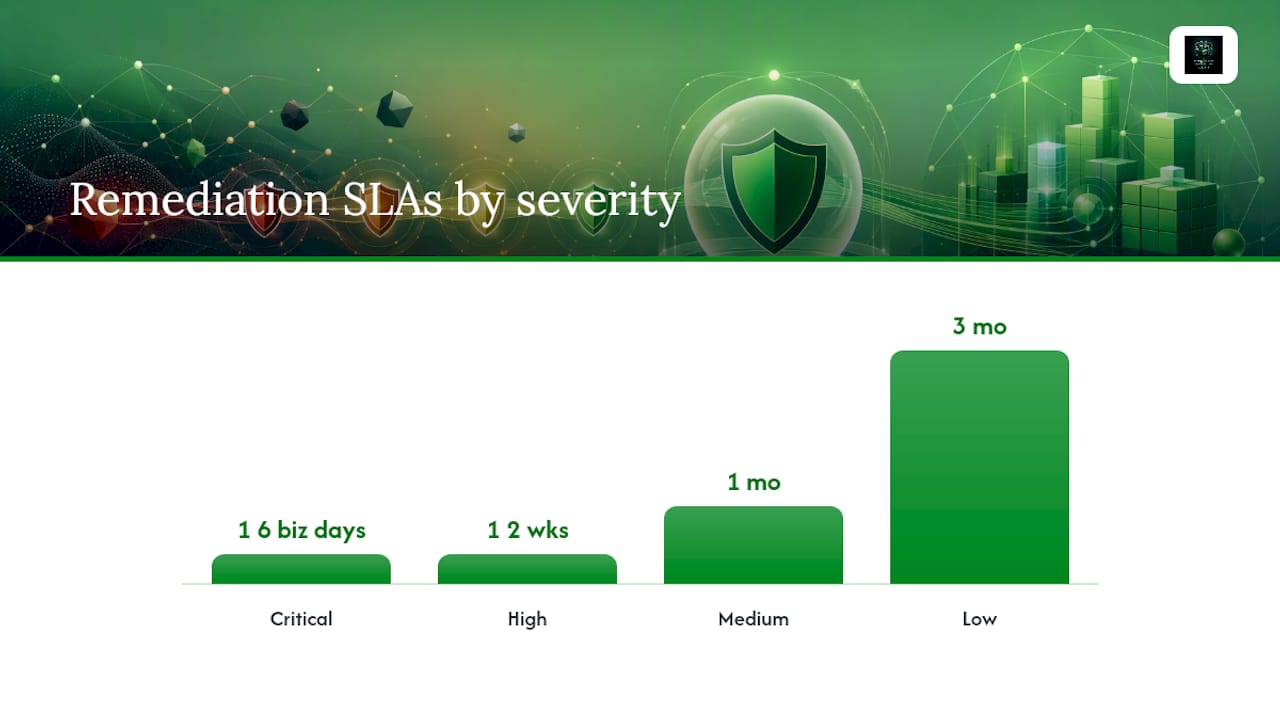
A defensible severity-to-SLA mapping looks like this:
| Severity | Remediation SLA |
|---|---|
| Critical | one to three business days |
| High | 1 to 2 weeks |
| Medium | 1 month |
| Low | 3 months |
Business context should shift priority even when CVSS scores are close. A medium-severity finding on a system holding regulated client data or crown-jewel intellectual property often deserves a faster SLA than a high-severity finding on an isolated test box. Once findings are scored, convert the list into a roadmap with named owners and calendar dates, not just a severity column. A remediation roadmap without an owner attached is a wish list, not a plan.
Structured scoring and consistent SLA mapping is standard practice across the industry, and SANS guidance on CVSS is worth keeping open while you write the risk section of any report.
Automating the Pentest Reporting Workflow
Reporting is where most engagements bleed time, and it's also the easiest part to fix with a repeatable pipeline. The goal is to capture evidence once, structure it consistently, and let automation carry it the rest of the way.
- Document as you go. Capture every command, screenshot, and observation during testing itself, not from memory afterward.
- Structure findings against a fixed schema from the start, so nothing needs reformatting later to export cleanly.
- Automate CVSS calculation and template your remediation language for common finding categories (SQL injection, misconfiguration, broken authorization).
- Export to a machine-readable format like OPTRS/JSON once findings are validated internally.
- Push directly into ticketing or vulnerability management systems, tagging each finding with both a human remediation note and a machine category tag for automatic routing.
- Schedule the retest and track closure status against the original finding IDs.
That last integration step matters more than it looks. Tagging findings with a remediation category, alongside the plain-language fix, lets downstream triage teams route tickets automatically instead of a human re-reading every finding to figure out which team owns it. OPTRS was built specifically to make that handoff to vulnerability management tools frictionless rather than manual.
Picking Templates That Actually Save Time
Template selection is a workflow decision, not a design preference. Run any candidate template against a short checklist before adopting it:
- Does it cover the compliance frameworks you report against most (SOC 2, PCI DSS, HIPAA)?
- Does it export to both a locked document format and a machine-readable schema?
- Does it fit how your team already works, or does it force a new tool everyone resists?
- Is it self-hosted or cloud-based, and does that match your data handling requirements?
Beyond the template itself, a few habits compound over an engagement: name screenshots consistently by finding ID, timestamp evidence the moment you capture it, stub out finding IDs before you start deep technical write-ups, and sanitize sensitive data immediately rather than promising yourself you'll clean it up later. Evaluate categories of tools, real-time documentation apps, automated report generators, and structured DOCX template libraries, on how well they fit your workflow rather than chasing the newest option. Adapting a template for PCI-specific reporting requirements usually just means adding evidence fields the standard's auditors expect to see by name.
Pre-Delivery Checklist Before You Send the Report
Run this before any report leaves your hands:
- Confirm all client-identifying metadata is scrubbed or properly redacted.
- Verify every finding has complete evidence: screenshot, command, and reproduction steps.
- Read the executive summary alone, without the technical appendix, and confirm it stands on its own.
- Encrypt the file and deliver it through a secure channel, never plain email.
- Include a named contact point for remediation questions and retest scheduling.
A minimal table of contents scales with engagement size: a small engagement might run 8 to 12 pages, a medium one 20 to 35, and an enterprise engagement well past 50 once appendices and multiple systems are involved. Always note retest dates and tracking status at delivery, not as a follow-up email later.
The vCISO View on Automated Reporting for Regulated Teams
Findings that live only in a PDF rarely make it into a risk register, and unregistered risk rarely gets remediated on schedule. Linking every finding to governance documentation changes that math directly. Automation handles the repeatable half of reporting: structure, scoring, export. Advisory work handles the half software can't: interpreting what a finding means for a specific regulatory posture and pushing remediation through leadership. Regulated organizations that pair both tend to close findings faster because nothing gets lost in translation between the pentest and the boardroom.
— vCISO
A Managed Path to Audit-Ready Pentest Reporting
Regulated organizations benefit from a vCISO relationship paired with an AI-enabled portal that produces audit-ready reports as a routine output, not a special project.
That combination matters most for law firms, oil and gas operators, energy companies, and other compliance-sensitive SMBs and mid-market teams that need repeatable reporting across 50+ frameworks without hiring a full-time security executive. A typical pilot engagement may include a sample report, a prioritized remediation roadmap with owners attached, and access to a platform for reporting and compliance workflow evaluation before committing further. If your current reporting process depends on one person's memory and a Word template from three years ago, that's the gap worth closing first. Learn more about CisoSafe's vCISO and compliance services and see what a pilot report would look like for your organization.
Standards Worth Bookmarking for Pentest Report Writing
- OWASP OPTRS: machine-readable schema for standardized findings
- OWASP WSTG reporting guidance: dual-audience structure and templates
- Pentest Standard: executive plus technical report structure
- NIST SP 800-115: formal test documentation guidance
- SANS scoring and report writing guidance: methodology and message-to-audience fit
Sources
- WSTG - v4.2 | OWASP Foundation
- OWASP Penetration Test Reporting Standard (OPTRS) | OWASP Foundation
- Technical Guide to Information Security Testing and Assessment (NIST SP 800-115)
- Pentest Standard — Reporting
- Writing a Penetration Testing Report (SANS)
FAQ
What Is a Pentest Report?
A pentest report is the formal document a penetration tester delivers after an engagement, combining a business-facing executive summary with detailed technical findings, proof-of-concept evidence, severity ratings, and remediation guidance.
What Does Pentest Stand For?
Pentest is shorthand for "penetration test," a simulated attack against a system, network, or application designed to find exploitable weaknesses before real attackers do.
Is Pentesting Illegal?
Penetration testing is legal when performed with documented, signed authorization from the system owner, typically captured in the rules of engagement before testing starts; testing systems without that authorization is illegal in most jurisdictions.
What Does a Pentest Report Look Like?
A well-built pentest report opens with a one-page executive summary, followed by an engagement summary, a findings table with severity and CVSS scores, detailed findings with reproducible proof-of-concept evidence, and appendices with raw sanitized output; many teams now also export a machine-readable version using a schema like OPTRS for direct integration into ticketing systems.