

Data classification sorts information by sensitivity so you can apply the right controls to the right data. For an SMB, the recommended approach is a 3-tier model, Public, Internal, and Restricted, paired with a one-page handling matrix, rolled out on two or three high-risk data stores first. Done this way, classification cuts accidental data leaks and turns audit prep from a scramble into a checklist.
TL;DR:
- Focusing on three data tiers—Public, Internal, and Restricted—streamlines classification and improves adoption without creating unnecessary complexity.
- Prioritizing high-risk data stores like HR, finance, and customer records during rollout minimizes overwhelm and accelerates compliance progress.
- Linking each classification label to specific controls, such as restricted sharing and encryption, reinforces enforcement and prevents data leaks.
- Limiting manual labeling by using folder structures and owner accountability reduces decision fatigue and increases consistency.
- Regular reviews and a simple, operational policy help maintain effectiveness and ensure the classification program remains aligned with business needs.
Table of Contents
- What Is Data Classification for SMBs, and How Is It Different From Discovery?
- What's the Best Data Tier Model for a Small Business?
- How Do You Roll Out Data Classification Without Overwhelming Your Team?
- How Do You Map Classification Labels to Actual Security Controls?
- Where Do SMB Classification Programs Usually Break Down?
- What Should a One-Page Data Classification Policy Include?
- How Does a vCISO Help SMBs Build and Maintain Classification Programs?
- A Pragmatic Take on Classification for Regulated SMBs
- How CisoSafe Builds Classification Programs That Actually Get Used
- Where to Go for Deeper Guidance
- Sources
What Is Data Classification for SMBs, and How Is It Different From Discovery?
Data classification means labeling information by how sensitive it is, so you know which controls to attach: who can access it, how it's shared, whether it gets encrypted, how long it's kept. Discovery is a separate step: finding out where your data actually lives across drives, inboxes, SaaS apps, and shared folders. You cannot classify what you haven't found. Labeling is the mechanical act of tagging a file or folder once classification and discovery are done.
Skipping the distinction is where most SMB programs go sideways. A law firm might assume it knows where client files live, then discover during a security assessment that paralegals have been syncing case documents to personal cloud drives for years. Discovery surfaces that. Classification decides what happens next.
The business case is straightforward. Unclassified data gets treated uniformly, which means either everything is locked down (killing productivity) or nothing is (creating risk). Classification makes protection proportionate: your marketing one-pagers don't need the same handling as your client Social Security numbers. It also sharpens Data Loss Prevention (DLP) accuracy, since DLP tools work far better against labeled data than against a guess. And when an incident happens, having pre-classified data means your response team already knows what was exposed and how bad that is, instead of reconstructing sensitivity levels during a breach.
Regulatory frameworks treat classification as foundational rather than optional. NIST SP 800-53 treats a clear taxonomy and defined scope as prerequisites for sizing security controls correctly. HHS's HIPAA security guidance effectively requires covered entities to know which data is Protected Health Information before they can protect it. Neither framework tells you exactly how to build your taxonomy. That part is on you, and it's where most SMBs either overbuild or never start. Our NIST RMF guide breaks down how classification outcomes feed into a broader control baseline.
What's the Best Data Tier Model for a Small Business?
Three tiers, applied consistently, beats five tiers applied inconsistently almost every time. SMB-focused guidance backs this up directly: a compact three-tier model with concrete examples drives far higher real-world adoption than an elaborate taxonomy that looks great in a policy binder and gets ignored on the shop floor, according to Mission Link Networks' data classification research.
Here's the default model:
- Public: Information meant for anyone. Marketing brochures, published blog posts, your website's public pages, press releases.
- Internal: Information for employees only, low risk if it leaked but still not for outside eyes. Internal memos, org charts, project plans, meeting notes.
- Restricted: Information that causes real damage if exposed. Customer PII, Social Security numbers, login credentials, financial account data, PHI, PCI cardholder data, and anything a regulator or a plaintiff's attorney would care about.
If your business genuinely needs a fourth tier, add Confidential between Internal and Restricted for data like contracts, salary information, or strategic plans; sensitive, but not regulated or immediately damaging if leaked. Most SMBs are better served staying at three. A fourth tier means a fourth decision every time someone saves a file, and that's exactly the kind of friction that kills adoption.
Give employees a fast gut-check instead of a flowchart: would this hurt someone if it leaked, and does a law or contract govern it? If yes to either, it's Restricted. If it's fine on the company intranet but not the open internet, it's Internal. If you'd be happy putting it on a billboard, it's Public.
Pro Tip: Skip abstract training on "what is sensitive data." Walk your team through 10 real files from your own systems and label them together. People remember examples, not definitions.
How Do You Roll Out Data Classification Without Overwhelming Your Team?
Don't try to classify everything at once. A minimum-viable program targeting your highest-risk data stores in a few weeks beats a company-wide initiative that stalls in month two.
Step 1: Scope it down. Pick two or three data stores where sensitive information concentrates: your HR system, your finance shared drive, and your customer records database are the usual suspects. Leave everything else for phase two.
Step 2: Inventory what's there (Week 1). Walk each chosen store and note, roughly, what lives in it. You don't need a perfect catalog. You need enough visibility to assign tiers sensibly.
Step 3: Define your tiers with real examples (Week 1). Take the three-tier model above and write down five to ten concrete examples per tier, pulled from your actual files. This becomes your one-page reference.
Step 4: Apply a folder and naming convention (Week 2). Before touching any automated labeling tool, use folder structure and filename prefixes. A folder named Restricted_ClientPII inherits its classification automatically for anything dropped inside it. This hybrid approach, structural labeling first, automation layered on top later, reduces friction while leaving room to scale, according to guidance from Cyber Advisors on SMB classification models.
Step 5: Turn on your top two or three technical controls (Week 2). Disable anonymous sharing links, require sign-in for Restricted folders, and turn on whatever built-in DLP scanning your platform already offers for patterns like Social Security numbers or credit card formats.
Step 6: Train your team in one short session (Week 3). Thirty minutes, real examples, the folder convention, and who to ask when they're unsure. Longer sessions lose people.
Step 7: Assign ownership. Every data store needs a named data owner (usually the department head who uses it daily), someone from IT or security responsible for technical enforcement, and a compliance contact who signs off on exceptions.
Step 8: Build a lightweight exceptions process. Someone will need to share a Restricted file with an external accountant or auditor. Define ahead of time how that request gets approved and logged, so people don't just work around the policy.
Step 9: Set a review cadence. Quarterly is realistic for most SMBs: revisit which stores are covered, spot-check a sample of files against their labels, and expand scope to the next data store once the first is stable.
Our guide on security frameworks for SMB firms covers how this rollout sequence fits into a broader compliance timeline if you're working toward SOC 2 or a similar framework.
How Do You Map Classification Labels to Actual Security Controls?
A label that doesn't change anything technical is just a sticker. Each tier needs to correspond to specific, enforceable rules across sharing, access, encryption, and transfer.
- Public: No access restrictions needed. Standard backup applies; no special encryption required.
- Internal: Restrict sharing to logged-in employees only, no external links. Standard multi-factor authentication (MFA) on the account suffices for access.
- Restricted: Block sharing outside the organization entirely by default. Require encryption at rest and in transit. Enforce conditional access, meaning access is denied automatically from unmanaged or unrecognized devices. Require MFA with no exceptions. Set shorter retention windows and log every access event.
For SMB IT teams starting from zero, the first three moves matter more than any fancy platform: stop anonymous sharing links company-wide, enforce organization-only sharing as the default for Internal data, and block unsecured email attachments carrying anything tagged Restricted. SMB-focused playbooks consistently point to these as the highest-leverage first steps because they close off the most common leak paths without requiring new software, per Cyber Advisors' SMB classification model.
Most business platforms already include the tools to enforce this: built-in sensitivity labeling and automated DLP pattern detection exist across most major cloud productivity suites. You don't need new software to start. You need to turn on what you already have and point it at your tiers. Azure's Well-Architected security guidance frames this well: classification should actively shape your architecture decisions, not sit in a policy document while your systems run wide open. Our breakdown of NIST-aligned IT security practices covers how to translate these controls into a documented baseline auditors recognize.
For businesses handling audio or transcribed data alongside PHI or PII, workflows involving outside vendors deserve particular attention; see this overview of transcription and data security practices for how classification extends to third-party processing.
Where Do SMB Classification Programs Usually Break Down?
Most failures trace back to three predictable mistakes.
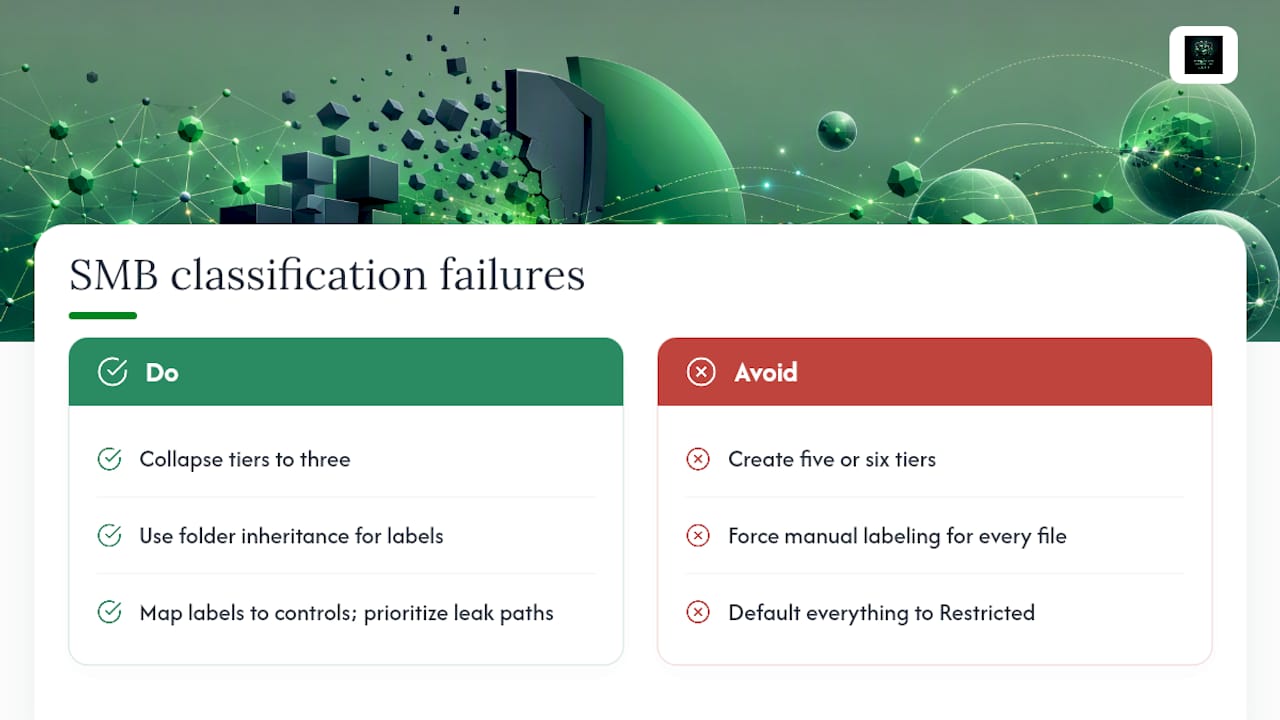
Too many tiers. Five or six classification levels sound rigorous on paper. In practice, employees can't reliably tell the difference between "Confidential" and "Highly Confidential," so they either guess or default to whatever's fastest. Fix it by collapsing to three tiers and anchoring each one to five concrete examples pulled from your own files.
Decision fatigue. Forcing someone to consciously choose a label on every single file, every single time, guarantees inconsistent labeling within weeks. Governance research on SMB security adoption identifies this kind of decision load as one of the primary reasons classification programs quietly die, according to a review of behavioral barriers to cybersecurity governance. Fix it with folder inheritance so location determines the label automatically, and reserve manual choices for genuine exceptions with a named approver.
Over-restriction. Locking everything down as Restricted "to be safe" grinds productivity to a halt and trains employees to route around the policy entirely. Fix it by mapping each label to its actual control set and prioritizing the leak paths that matter most: public sharing links, email attachments, and unmanaged personal devices.
Pro Tip: If a large share of your files end up labeled Restricted, your definitions are too broad. Restricted should be the exception, not the default.
What Should a One-Page Data Classification Policy Include?
A usable policy fits on one page and answers, for each tier, exactly what an employee is allowed to do. The handling matrix is the operational core; publish it somewhere every employee can find in ten seconds, and review it against real practice at least twice a year.
| Tier | Storage | External Sharing | Encryption | |
|---|---|---|---|---|
| Public | Any approved location | Allowed | Allowed | Not required |
| Internal | Company drives only | Blocked by default | Internal only | Standard |
| Restricted | Approved secure storage only | Blocked, exceptions require approval | Encrypted attachment or secure link only | Required, at rest and in transit |
Templates that tie tiers directly to storage, sharing, encryption, and disposal rules give auditors a fast way to verify compliance, which is exactly what a free data classification policy template is built around. Adjust the matrix to your own regulatory exposure: a healthcare practice adds a PHI-specific retention column, an oil and gas operator adds a third-party vendor row for pipeline sensor data.
How Does a vCISO Help SMBs Build and Maintain Classification Programs?
A vCISO turns classification from a document into a working system. That means drafting the policy language, mapping each tier to actual technical controls in your specific environment, tuning DLP rules during a pilot so they don't flood your team with false positives, and compiling the audit evidence auditors actually ask for.
The measurable outcomes tend to look like this: fewer false-positive DLP alerts pulling IT away from real work, audit prep measured in days instead of weeks, and a governance structure that survives after the vCISO engagement ends because data owners and review cadences are already in place.
A Pragmatic Take on Classification for Regulated SMBs
Classification programs fail when they're built to satisfy an auditor instead of a workflow. The ones that hold up tie each tier to a business outcome employees already care about, faster incident triage, cleaner audit evidence, fewer 2 AM calls about a leaked spreadsheet. Measure adoption quarterly or it quietly erodes.
— vCISO
How CisoSafe Builds Classification Programs That Actually Get Used
CisoSafe is the alternative to hiring a full-time CISO or a large consultancy to get your classification program off the ground, at a fraction of the cost and without a permanent headcount commitment. A typical engagement runs discovery on your highest-risk data stores, builds your three-tier model and one-page matrix, rolls out the minimum-viable program across your priority systems, and delivers quarterly audit evidence so your compliance posture doesn't quietly decay after launch.
That translates into fewer accidental exposures, faster incident response because your team already knows what's sensitive, and documentation that holds up when SOC 2, HIPAA, or PCI DSS auditors come asking. If you're trying to figure out where your firm's Restricted data actually lives and who can currently touch it, that's the starting question CisoSafe's vCISO team answers first. Start a conversation with CisoSafe's vCISO team about scoping your first classification sprint.
Where to Go for Deeper Guidance
For primary-source reading beyond this playbook: NIST SP 800-53 for control baselines, HHS's HIPAA security rule guidance for PHI-specific requirements, and our HIPAA Security Rule compliance guide for a practitioner-level walkthrough. Regulatory applicability varies by industry and jurisdiction, so confirm which frameworks actually govern your business before finalizing your policy.
Sources
- HHS — HIPAA: Security Rule and related regulations
- NIST SP 800-53 revision 5
- Azure Well-Architected Framework — data classification
- Data classification scheme for SMBs — the 3-tier model that's simple enough to actually use | Mission Link Networks